
A 15-Minute Calendar Drift Audit to Prevent Overlaps Between Tasks, Meetings, and Notes
By Taylor
A quick 15-minute weekly audit to align calendar, tasks, and notes, prevent overlaps, and protect focused work blocks.
The Calendar Drift Audit is the weekly reset most people skip
Calendar drift is what happens when your “real week” slowly diverges from what your calendar, task list, and meeting notes say is happening. It’s rarely dramatic. It’s a 10-minute meeting that never got logged, a task you meant to do “sometime Tuesday,” a note you captured in a hurry and then forgot to connect to anything.
The problem isn’t that you’re disorganized. It’s that work is multi-surface: the calendar holds time, the task manager holds intent, and notes hold context. When those three stop matching, you get silent overlaps—two commitments in the same hour, three sources of truth, and a week that feels busy but oddly unproductive.
The Calendar Drift Audit is a 15-minute ritual that forces alignment before drift becomes derailment. You’re not “planning the week.” You’re reconciling it.
What you’re actually auditing in 15 minutes
This audit has one goal: ensure every meaningful commitment has (1) a time, (2) an owner (usually you), and (3) the right context attached. You’re looking for four categories of drift:
- Time drift: tasks with no realistic time block, meetings with no buffer, deadlines that don’t match reality.
- Scope drift: a meeting that generated follow-ups that never became tasks, or tasks that quietly grew into mini-projects.
- Context drift: notes that aren’t attached to the meeting or task they belong to, so you can’t find them when it matters.
- Priority drift: what you’re spending time on no longer matches what you say matters this week.
A unified workspace helps because you can see these mismatches in one place. That’s the core idea behind Routine: calendar, tasks, and notes living together so the audit is quick instead of a scavenger hunt across tabs.
The 15-minute ritual step by step
Set a timer. The constraint is what makes this sustainable. If you let it expand, it turns into a full planning session and you’ll stop doing it.
Minute 0–3: Scan the calendar for “hard edges”
Start with the calendar because it contains the non-negotiables. Look at the next 5–7 days and identify:
- Days with back-to-back meetings and no recovery time
- Meetings that require prep but have no prep block
- Meetings that will obviously produce follow-ups (client calls, reviews, interviews)
- Travel, time zone shifts, or personal constraints you forgot to account for
Your output for this step is simple: add buffers and prep blocks where they’re clearly missing. Even 10–15 minutes before a meeting can prevent the “I’ll do it right before” trap.
Minute 3–7: Pull tasks into time blocks (and force realism)
Next, look at your task list and ask one blunt question: “Which of these is real this week?” If a task matters, it needs a home on the calendar. If it doesn’t, it needs to get out of your head.
Do three quick moves:
- Time-block the top tasks: pick 3–5 outcomes that would make the week feel successful and place them into open blocks.
- Defuse the ‘sometime’ tasks: either schedule them, downgrade them, or move them out of this week.
- Right-size your blocks: if you keep giving a 90-minute task a 20-minute slot, the drift isn’t in your calendar—it’s in your estimates.
If your team plans in lightweight cycles rather than heavy ceremonies, you can align this audit with that cadence. The goal is to protect weekly shipping without adding process weight. (Related: cycle planning without Scrum theater.)
Minute 7–11: Reconcile meeting notes into actions
This is where drift hides best. Meetings happen, notes get written, and then the week moves on. The audit forces a conversion step: every meeting note should produce one of three outcomes:
- A task: something you (or someone else) will do.
- A decision: something that’s now true and should be captured clearly.
- A reference: information you’ll need later (and should be findable).
Scan recent meeting notes (especially from the last 7–10 days). For each note, ask:
- Is there an untracked follow-up hiding in here?
- Is the owner explicit?
- Is there a date, or is this going to float forever?
Create tasks for the follow-ups and attach them to the right meeting or project. If your notes are sitting in a separate app, this step is slower and easier to skip. In a combined calendar-task-note view, it’s a fast loop: note → action → scheduled time.
Minute 11–13: Catch silent overlaps and double-booking
Now look for conflicts created by good intentions:
- A task block sitting on top of a meeting you accepted later
- Two deep-work blocks on a day packed with calls (energy mismatch)
- Work that depends on someone else, scheduled before you can possibly get their input
- Multiple “important” tasks competing for the same prime hours
Fixes are usually small: move one block, shorten another, add a waiting-for note, or create a quick “dependency check” task. The goal is not perfection; it’s reducing surprise.
Minute 13–15: Lock the week with a single weekly intention
End by writing one sentence that defines success for the week. Not a vague aspiration—something testable, like:
- “Ship the onboarding email fix and confirm tracking is correct by Thursday.”
- “Close the loop on renewal-risk feedback and deliver a build plan.”
- “Complete two focused work blocks on the Q3 reporting cleanup.”
This sentence becomes your drift alarm. If your calendar fills up and that intention has no protected time, you’ll see the mismatch immediately.
How to make the audit stick (without turning it into another chore)
Pick a trigger, not a mood
Attach the audit to a reliable moment: Monday morning before you open email, or Friday afternoon as a shutdown ritual. Consistency matters more than the “best” day.
Keep a small checklist so you don’t think
The point of a ritual is that it’s repeatable. Use the same micro-checks each time: hard edges → task realism → notes to actions → overlaps → weekly intention.
Use one workspace when possible
The audit is hardest when your system is fragmented. When your calendar lives in one tool, tasks in another, and notes in a third, drift is almost guaranteed. A platform that brings them together reduces friction: you can time-block tasks, capture meeting notes where the meeting lives, and turn decisions into follow-ups immediately.
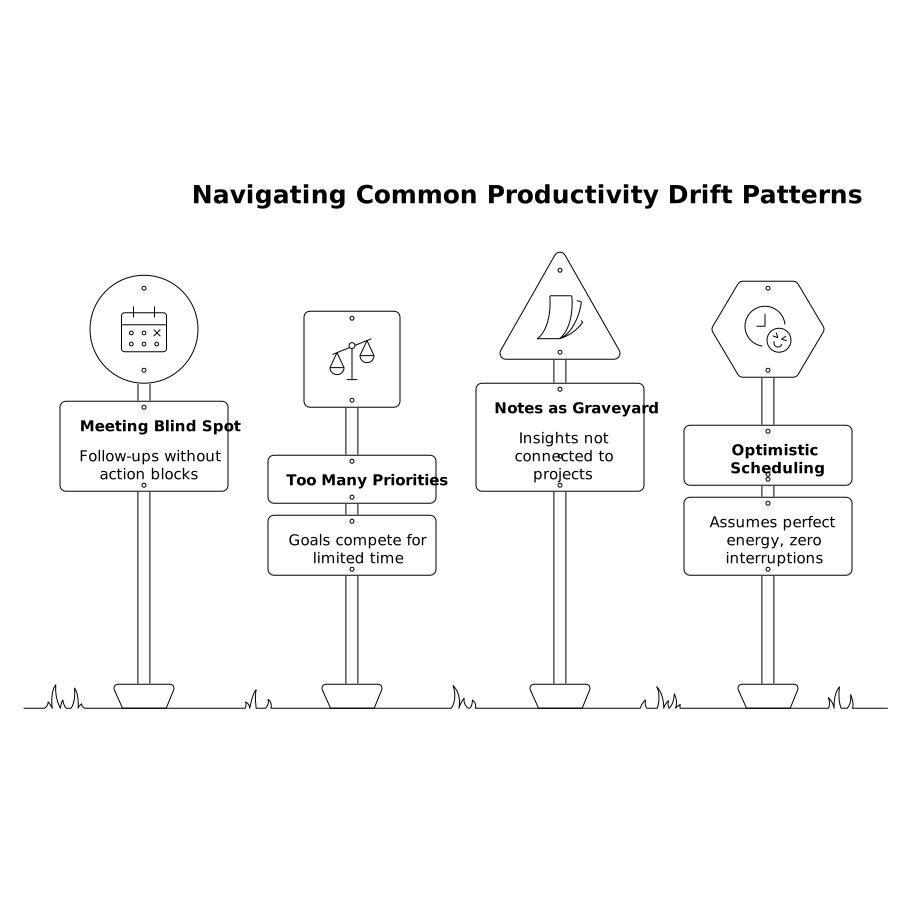
Common drift patterns to watch for
- The “meeting generates work” blind spot: recurring meetings that regularly create follow-ups but never get a post-meeting action block.
- The “too many priorities” week: five top goals competing for three good work sessions.
- The “notes as a graveyard” problem: useful insights captured but not connected to a project or next step.
- The “optimistic scheduling” loop: time blocks that assume perfect energy and zero interruptions.
If you notice drift tied to inputs from customers or stakeholders, consider tightening the path from feedback to action so it’s easier to schedule real work. (Related: turning feedback into a churn-risk build plan.)
What changes when you do this every week
You don’t just get a cleaner calendar. You get fewer “invisible” commitments, less context switching, and a week where tasks, meetings, and notes tell the same story. The audit is small, but it prevents the slow accumulation of mismatches that make work feel chaotic.
Frequently Asked Questions
How does Routine help reduce calendar drift compared with separate apps?
Routine keeps calendar, tasks, and notes in one workspace, so it’s easier to spot mismatches and turn meeting notes into scheduled follow-ups without jumping between tools.
When is the best time to run a Calendar Drift Audit in Routine?
Most people succeed with a consistent trigger: Monday morning before email, or Friday afternoon as a shutdown ritual. In Routine, either works as long as it’s weekly and timed.
What should I do with tasks that don’t fit anywhere in Routine after the audit?
If a task matters this week, give it a time block. If it doesn’t, move it to a later list/project or delete it. Routine’s value comes from keeping the scheduled plan realistic.
How do I turn meeting notes into action items inside Routine without over-planning?
Use a simple rule: every meeting note becomes a task, a decision, or a reference. Create only the next action and assign it a time block or an owner—no need to build a full project plan.
Can teams use Routine for shared drift audits and alignment?
Yes. Teams can use Routine to share agendas and notes, then convert agreed follow-ups into tasks. That reduces the common drift where decisions live in notes but never become owned actions.