
The feedback intent layer to separate jobs, feature requests, and workarounds
By Taylor
Use a feedback intent layer to separate jobs, feature requests, and workarounds so prioritization reflects outcomes, not noise.
Why an “intent layer” makes feedback easier to prioritize
Most feedback systems break down when everything is treated as the same kind of input. A user writes “Please add X,” another says “This is impossible without Y,” and a third quietly describes a workaround they’ve built in spreadsheets. If those all land in one bucket called “feature requests,” prioritization turns into vote-counting and anecdote battles.
The feedback intent layer is a lightweight classification step you apply before scoring, voting, or planning. It separates three different signals:
- Jobs-to-be-Done (JTBD): what the user is trying to accomplish and why it matters.
- Feature requests: a proposed product change, usually one possible solution.
- Workarounds: what users do today to get the job done despite product gaps.
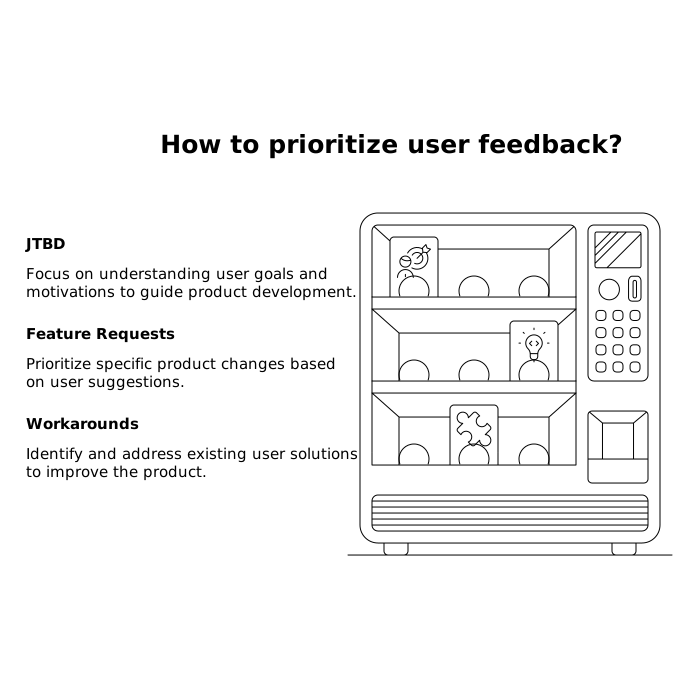
Once these are separated, you can keep the emotional content of feedback (pain, urgency, stakes) without letting the proposed solution hijack your roadmap.
Define the three intent types with practical tests
1) Jobs-to-be-Done intent
JTBD feedback answers: “What are you trying to do, in what context, and what happens if you can’t?” It often sounds like a narrative rather than a request.
- Tell: Mentions an outcome, constraint, or decision being made.
- Quick test: If you removed the product name, would the sentence still make sense?
- Example: “I need to share a quarterly progress update with execs without manually reconciling numbers from three tools.”
JTBD intent is the best input for product strategy because it’s stable. Tools and UI preferences change; the underlying job tends to persist.
2) Feature request intent
Feature requests answer: “What should you build?” They’re valuable, but they’re also biased toward what the user can imagine and toward the interface they already know.
- Tell: Starts with “Add,” “Support,” “Integrate,” “Can you make it so…”
- Quick test: Does the feedback propose a specific mechanism (button, field, integration, export) as the solution?
- Example: “Add a Salesforce integration so we can sync account status.”
Feature requests should be stored, deduplicated, and linked to the job they’re attempting to solve.
3) Workaround intent
Workarounds answer: “What do you do instead?” They’re especially useful because they reveal hidden costs and risk: manual labor, shadow IT, inconsistent data, or security exposure.
- Tell: Phrases like “What we do is…,” “We export to CSV and…,” “We built a script,” “We keep a spreadsheet.”
- Quick test: Is the user describing a process outside your product to complete the job?
- Example: “We export every Friday, paste into Sheets, and run a pivot table to get the report.”
Workarounds can be stronger evidence than votes because they show real effort spent to solve the problem.
How to add the intent layer to your feedback workflow
You don’t need a heavy taxonomy. Start with a single required field: Intent = Job / Feature / Workaround. Then add two optional companion fields that make the intent usable downstream:
- Job statement (one sentence): “When…, I want to…, so I can…”
- Current workaround (if any): Free text describing the steps/tools.
The key is sequencing: collect raw feedback → classify intent → normalize into a job statement → then prioritize.
Capture prompts that improve intent quality
Most users default to feature requests because it’s the easiest way to express frustration. You can steer them toward intent-rich input with prompts like:
- “What are you trying to accomplish?”
- “What happens if you can’t do this?”
- “How are you handling it today?”
Those three questions reliably surface the job and the workaround even when the user starts with a solution.
Turn mixed feedback into clean inputs without losing nuance
Real feedback often includes all three intents in one message. The intent layer doesn’t force you to pick one “truth”; it tells you what to extract.
Here’s a practical approach product and support teams can use:
- Split the message into claims: highlight sentences that describe outcomes, solutions, and current processes.
- Write the job statement first: if you can’t articulate the job, you’re not ready to score the request.
- Attach features and workarounds to the job: features become candidate solutions; workarounds become evidence and cost.
This is where a feedback platform helps because you want the job to become the “hub” object you can link multiple requests to. In canny.io, teams commonly centralize feedback from a portal and internal sources, then group duplicates and connect them to specific use cases and customer segments—exactly the sort of structure the intent layer benefits from.
Prioritization becomes clearer when intent is separated
Once you’ve applied the intent layer, you can prioritize with fewer false debates. A few practical scoring patterns become possible:
- Prioritize jobs, not features: rank the job by frequency, revenue exposure, strategic alignment, and severity.
- Evaluate features as options: compare multiple solutions against the same job (including “do nothing”).
- Use workarounds as cost signals: time spent, error rate, compliance risk, and tool sprawl can raise priority even if the request count is low.
If you already run a workflow that connects feedback to renewal risk, the intent layer gives you cleaner inputs for that pipeline. It’s much easier to assess risk when you know whether a customer is blocked on a job, merely asking for a convenience feature, or operating with a fragile workaround. (Related: Feedback to Churn Pipeline That Tags Requests by Renewal Risk and Turns Them into a Build Plan.)
Common pitfalls and how to avoid them
Confusing “job” with “user story”
A job is outcome-driven and context-aware; a user story can still be a solution in disguise. If your “job” mentions a specific UI element, you’re probably looking at a feature request.
Letting the loudest workaround dominate
A clever workaround can look impressive, but don’t over-prioritize novelty. Translate it into: time cost, error cost, and risk. Two users spending four hours a week on manual reconciliation may matter more than twenty users wanting a nicer dashboard.
Turning intent tags into bureaucracy
If it takes more than a minute to apply the intent layer, it won’t stick. Keep the tags minimal, and rely on short text fields. You can always enrich later during discovery.
A simple template you can use today
- Intent: Job / Feature / Workaround
- Job statement: When ___, I want to ___, so I can ___.
- Evidence: Number of accounts affected, revenue tier/segment, severity, frequency.
- Workaround: Steps and tools, time spent per week, known failure modes.
- Requested feature (if provided): captured verbatim, linked to the job.
With this in place, your backlog stops being a list of disconnected asks and becomes a map of jobs, constraints, and proof. That’s the point of the feedback intent layer: clarity first, prioritization second.
Frequently Asked Questions
How does canny.io support a feedback intent layer in practice?
canny.io helps centralize feedback, deduplicate similar posts, and organize requests so you can attach multiple feature ideas and workaround notes to the same underlying job-to-be-done.
Should we store Jobs-to-be-Done as separate items from feature requests in canny.io?
Yes. Treat the job as the parent theme (the “why”), then link feature requests as candidate solutions. In canny.io this keeps votes and discussions connected to the real outcome you’re prioritizing.
How do you tag a piece of feedback that includes a job, a feature request, and a workaround in canny.io?
Tag the overall item by the primary intent (usually the job), then capture the feature request verbatim in the description or a linked post, and record the workaround as evidence. The goal is preserving all three signals without mixing them.
What’s the fastest way to train support and sales to capture intent for canny.io?
Give them a three-question prompt: “What are you trying to accomplish?”, “What happens if you can’t?”, and “How do you handle it today?” Paste answers into canny.io so product can normalize them into a one-sentence job statement.
Do workarounds deserve higher priority than feature requests in canny.io?
Not automatically, but they’re stronger evidence. In canny.io, treat workarounds as cost and risk indicators (time spent, error rate, compliance concerns) that can raise a job’s priority even with fewer votes.