A Permission-First AI Notetaker Rollout Script for Sales, CS, and Healthcare Calls
By Taylor
Permission-first AI notetaker rollout scripts for Sales, CS, and healthcare calls plus training tips that keep adoption high.
Make consent the default without making it awkward
Rolling out an AI notetaker is rarely a technical problem. It’s a trust problem. The fastest way to kill adoption is to surprise people with recording or to bury disclosure in policy docs no one reads. The fastest way to keep adoption high is to make consent simple, consistent, and repeatable—so teams can ask every time, in plain language, without sounding like they’re reading legalese.
This guide gives you a step-by-step “permission-first” consent and disclosure script you can hand to Sales, Customer Success, and healthcare-adjacent teams. It’s designed for real calls: short, confident, and flexible. We’ll also cover how to train teams, handle pushback, and set up a lightweight audit trail—so you can scale responsibly while still moving fast.
The permission-first rollout in 6 steps
Step 1: Decide what you’re asking permission for
People react differently to “recording,” “transcription,” and “AI summary.” Before you write scripts, align internally on what the tool actually does in your environment:
- Is the call recorded, or only transcribed?
- Who can access the transcript and summary (just the meeting owner, the whole team, admins)?
- How long is data retained?
- Will notes sync into systems like a CRM?
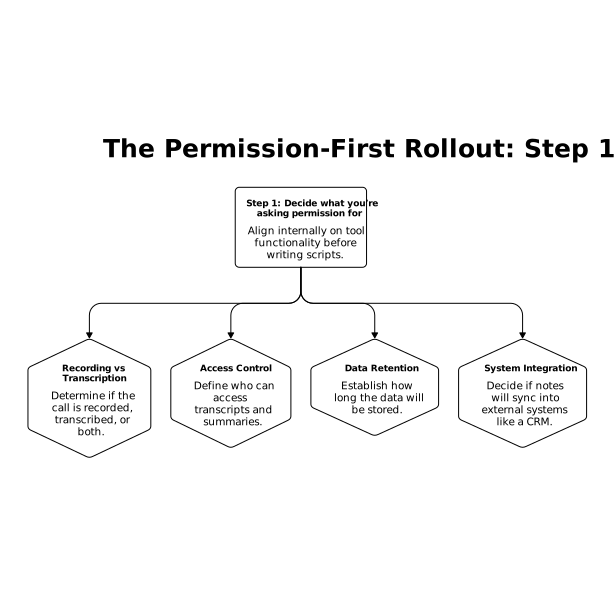
Once you can answer those plainly, disclosure becomes a 10-second habit instead of a debate.
Step 2: Use a standard opening line that fits your role
Here are short, copy/paste-ready openers. The structure is the same each time: what’s happening, why, what you control, explicit permission.
Sales call opener
Script: “Quick heads-up: I use an AI notetaker to capture a transcript and send me a summary and action items after the call, so I can stay focused. Are you okay with it running today? If not, no problem—I’ll turn it off and take notes manually.”
Optional add-on (if asked): “Only our internal team uses the notes to follow up, and you can ask me to remove anything you’d prefer not be captured.”
Customer Success call opener
Script: “Before we start—would you mind if I run an AI notetaker? It creates a transcript and summary so we don’t miss decisions and next steps. If you’d rather not, I’ll disable it.”
Optional add-on: “It also helps us track commitments so your open items don’t get lost between meetings.”
Healthcare-adjacent or sensitive-context opener
Script: “Just to confirm before we begin: I can use an AI notetaker to transcribe and summarize for accuracy. It’s optional—are you comfortable with that today? If not, we’ll proceed without it.”
Optional add-on: “If there’s anything you don’t want recorded, tell me and we’ll pause the notetaker or switch to manual notes.”
Step 3: Build a “yes/no/conditional yes” branching response
Most teams only script the happy path. You’ll raise trust faster if you script the other two outcomes as well.
- If they say yes: “Thanks—appreciate it. I’ll share the key takeaways after.”
- If they say no: “Totally fine. Turning it off now. I’ll take manual notes and we’ll still send a recap.”
- If they say “yes, but…”: “Of course. What would you like excluded—pricing, personal details, or anything else? We can pause recording for that section.”
That last option (“yes, but…”) is where adoption survives in regulated or high-trust environments. It signals control, not coercion.
Step 4: Add a mid-call reminder for topic shifts
If the conversation moves into sensitive territory (health details, security architecture, incident response, employee issues), train reps to do a quick check-in:
Script: “We’re about to get into details that may be sensitive. Want me to pause the notetaker for this part?”
This doesn’t need to happen often—only when the subject matter changes materially. But when it does, it prevents the “I didn’t realize this was being captured” moment that erodes trust.
Step 5: Close with a recap and a clear next-step artifact
Consent feels worth it when the output is useful. Make the payoff visible:
Script: “I’ll send a summary with decisions, action items, and owners. If anything looks off or you want a line removed, tell me and I’ll fix it.”
That final sentence does two things: it reduces fear of permanence, and it encourages accountability for accuracy.
Step 6: Log consent in a lightweight, auditable way
You don’t need a heavy process to be responsible, but you do need consistency. Choose one of these approaches:
- Calendar invite disclosure: add a line like “AI notetaker may be used with permission at the start of the call.”
- CRM checkbox or note: “Consent granted” / “Declined” / “Partial—paused during section.”
- Meeting note template: first line: “Consent: yes/no/conditional”
If you already treat systems as queues for follow-ups, you can keep the process simple by capturing consent alongside next steps—similar to how some teams use a calendar as a queue to auto-schedule follow-ups without adding a second workflow.
Training guidance that keeps adoption high
Teach the “10-second disclosure” as a sales skill
Reps worry that asking permission will reduce conversions. In practice, the bigger risk is losing trust later. Train on delivery: calm tone, short phrasing, and a real willingness to turn it off. If someone senses you’re asking “as a formality,” they’ll push back.
Make it consistent across channels
Use the same phrasing in video calls, phone calls, and screen shares. Consistency is what makes disclosure feel normal. In team enablement, give people one default script and one “sensitive topic” reminder; avoid giving them ten variants they’ll never memorize.
Decide what gets synced into downstream tools
Adoption can drop if people fear that every word will land in a CRM forever. Define guardrails: which fields can be auto-populated, what should remain in meeting notes only, and what should never be stored. If your organization already has security playbooks for collaboration workflows, align this rollout with those patterns so teams aren’t improvising access controls under pressure.
Where Fathom fits in a permission-first rollout
A permission-first script works best when the product experience matches the promise: fast recap, clear action items, and predictable sharing. Fathom is designed around that meeting flow—capturing transcripts and summaries quickly so teams can stay present during the call and still leave with a usable record for decisions and follow-through.
The practical rollout tip: keep the tool consistent across Sales and CS first, then expand to higher-sensitivity workflows after you’ve proven the disclosure pattern and built confidence in how notes are shared, retained, and corrected.
Quick reference scripts to paste into enablement docs
Short universal opener
“Is it okay if I use an AI notetaker to transcribe and summarize today? If not, I’ll turn it off.”
Short sensitive-topic reminder
“We’re about to cover something sensitive—want me to pause the notetaker for this part?”
Short close
“I’ll send the recap with action items. If you want anything removed or corrected, tell me and I’ll update it.”
Frequently Asked Questions
How should teams ask for consent when using Fathom on a customer call?
Use a 10-second disclosure: say Fathom will transcribe and summarize, why it helps, and that you can turn it off immediately if they prefer—then ask directly for permission.
What if someone says no to Fathom recording or transcription?
Acknowledge it without debate, disable Fathom right away, and continue with manual notes. Still send a written recap so the meeting outcome doesn’t suffer.
Can we use Fathom if the call shifts into sensitive topics mid-meeting?
Yes, but train a mid-call check-in: when the topic becomes sensitive, offer to pause Fathom for that section and resume only if everyone is comfortable.
How do we keep Fathom adoption high without creating compliance chaos?
Standardize one script per role, add a brief invite disclosure line, and log consent in a single place (CRM note or meeting template). Consistency drives both trust and usage.
Should Fathom summaries be automatically synced into a CRM?
Only if you set clear rules first. Many teams sync action items and high-level outcomes while keeping raw transcripts more restricted, so Fathom helps execution without overexposing details.