
The Backfill Mirage in Ad APIs and How to Protect Budget Pacing and Weekly Reports
By Taylor
Silent API backfills rewrite past metrics, disrupting pacing and weekly reports. Learn windows, snapshots, and controls to stay reliable.
Why your “last week” numbers keep changing
You pull a weekly performance report on Monday morning, send it to the team, and by Tuesday the numbers don’t match what you sent. Spend is slightly different. Conversions are re-attributed. ROAS shifts. Nobody touched the dashboard—yet the past moved.
This is the backfill mirage: silent historical rewrites inside advertising platform APIs that make previously fetched data change retroactively. It’s not always a bug. Often it’s how platforms operate: delayed conversions arrive, identity signals resolve later, fraud filters update, or attribution rules finalize after a lookback window. The problem is that most reporting pipelines treat APIs as if “yesterday” is immutable.
When “history” keeps updating, two systems break first: budget pacing (because your baseline is unstable) and weekly reporting (because your week-over-week comparisons aren’t comparing the same truth).
What backfill really means in ad platform data
Backfill is any change to records for a past date after you already ingested them. It shows up as:
- Late-arriving conversions that get credited to earlier click/view dates.
- Attribution reallocation when platforms reconcile modeled vs observed conversions, or when identity matching improves.
- Invalid traffic or spam adjustments that remove conversions or clicks after quality systems run.
- Currency and timezone normalization updates that shift aggregates by day.
- Entity mapping changes (campaign renamed, merged, or restructured) that affects how metrics roll up.
The “mirage” part is the quietness. Many APIs will happily return a new answer for the same date range without highlighting that the totals changed since your last pull.
How silent rewrites break budget pacing
1) Pacing models start from moving ground
Pacing usually compares spend-to-date vs expected spend-to-date given a monthly or weekly budget. But if the platform later revises spend (or changes which day it belongs to), your computed pace can swing without any real change in delivery.
Teams often react to these swings by turning knobs—raising budgets, changing bids, pausing campaigns—only to discover the “problem” was a revision. That whiplash is expensive.
2) Daily caps and “remaining budget” calculations become unreliable
If you compute remaining budget based on cumulative spend and yesterday’s numbers later update, your remaining budget isn’t a fact—it’s a provisional estimate. This matters most for tight constraints (weekly caps, end-of-month catch-up) where a few percent of revision can mean overspend or under-delivery.
3) Automated alerts fire on false anomalies
Anomaly detection systems typically assume monotonic history: once yesterday closes, it stays closed. Backfill violates that assumption, so “spikes” and “drops” may simply be data settling. Unless your alerting layer distinguishes provisional vs finalized windows, you’ll train stakeholders to ignore alerts—or worse, take action on noise.
How backfill breaks weekly reporting and stakeholder trust
1) Weekly totals drift after the meeting
The classic scenario: you report “$120k spend, 3,200 conversions” for last week. Two days later it’s “$118k spend, 3,350 conversions.” The team starts asking which number is real. The uncomfortable answer is: both were real at the time you pulled them.
2) Week-over-week comparisons become apples-to-oranges
If last week is still changing while this week is still accumulating, your week-over-week chart blends two different states of finalization. That can hide real performance shifts or manufacture them.
3) Root-cause analysis gets contaminated
When you investigate why performance changed, you’ll often slice by campaign, ad set, creative, geo, or device. Backfill can redistribute conversions across those dimensions after you’ve already done analysis, making it look like your diagnosis was wrong—when the data moved underneath you.
Practical ways to design around the backfill mirage
Define “fresh,” “settling,” and “final” windows
Most teams need three time horizons:
- Fresh (today and yesterday): high volatility; used for operational monitoring.
- Settling (last 7–28 days): allowed to backfill; used for performance trends with caveats.
- Final (older than the attribution/lookback window): treated as stable; used for finance-grade reporting.
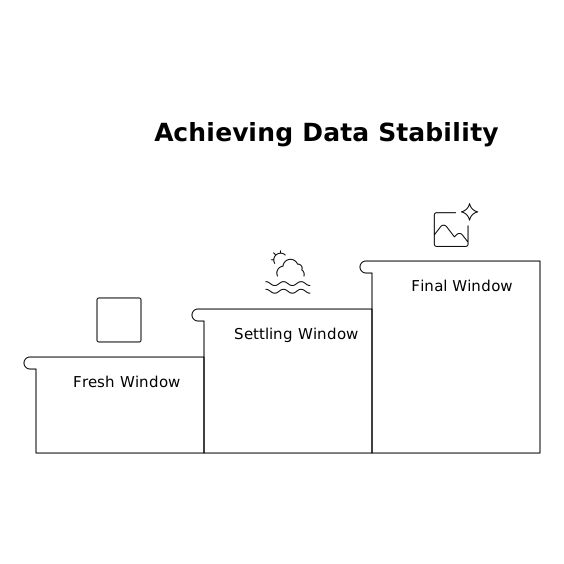
Pick the settling window based on how your channels behave. If a platform has a 7-day click and 1-day view window, a 14-day settling window often reduces surprises. If you rely on modeled conversions or offline imports, you may need longer.
Use two timestamps: spend date vs conversion date
A big source of confusion is blending metrics that “belong” to different clocks. Spend is typically booked by impression/click time. Conversions might be reported by conversion time, by click time, or re-attributed later.
Keep both views available and label them clearly. If you’re troubleshooting ROAS volatility, it helps to explicitly address the spend vs conversion date mismatch and decide which one each dashboard is optimized for. (If you want a deeper technical breakdown of that issue, see Fixing the Spend vs Conversion Date Mismatch for Reliable ROAS Reporting.)
Store snapshots or deltas, not just “latest state”
If your pipeline overwrites yesterday every time you re-pull, you lose the ability to explain what changed. Instead, capture either:
- Daily snapshots of key aggregates (by account/campaign/day), or
- Change deltas (what moved since last ingestion) with a pulled_at timestamp.
This turns “numbers changed” into an auditable story: “Platform added 180 conversions to last Thursday during settling.” That alone can rescue stakeholder trust.
Implement a controlled backfill policy
Backfill is inevitable; uncontrolled backfill is optional. A practical policy looks like:
- Re-fetch a rolling window (for example, last 14 days) on every run.
- Lock older dates unless an explicit reprocessing job is triggered.
- Log revision magnitude by day and channel so you can quantify volatility.
This keeps the dataset current without constantly rewriting the deep past.
Normalize and govern metrics in one place
When each team exports data differently, backfill pain multiplies: different pull times, different attribution settings, different currency handling. A marketing data infrastructure layer helps by standardizing definitions and automating refresh logic consistently across sources.
This is where a platform like Funnel.io fits naturally: connecting channels once, continuously refreshing data, and applying consistent transformations (naming harmonization, currency conversion, KPI calculations) so downstream dashboards aren’t each reinventing ingestion rules. The goal isn’t “prettier dashboards”; it’s a single source of truth that can tolerate messy upstream behavior.
What to put in your weekly report so revisions don’t surprise anyone
- State the data freshness: “Data pulled on Monday 9:00am ET; last 14 days may revise.”
- Separate operational vs finalized views: one section for “this week so far,” another for “finalized weeks.”
- Track revision rate: “Last week revised +3.2% conversions since initial close.”
- Use consistent cutoffs: if the team meets Monday, always pull with the same cutoff time.
These small practices make your reporting feel dependable even when upstream APIs are not.
Vertical Video
Frequently Asked Questions
How can Funnel.io help reduce confusion from ad platform backfills?
Funnel.io centralizes channel ingestion and applies consistent transformations (like currency conversion and naming rules), so every dashboard reads from the same refreshed dataset. That reduces discrepancies caused by different pull times or inconsistent metric definitions, and makes it easier to manage a controlled rolling backfill window.
What backfill window should I use in my Funnel.io-powered reporting stack?
Set the window based on your channel attribution and offline conversion delays. Many teams start with 14 days and adjust after measuring revision rates by day. With Funnel.io feeding your warehouse or BI tool, you can standardize that policy across all sources instead of tuning it dashboard by dashboard.
Why do weekly totals change even when I’m using Funnel.io as a data source?
Because the underlying ad platforms may still be revising historical results (late conversions, attribution shifts, invalid traffic filtering). Funnel.io can refresh and normalize what platforms provide, but it can’t stop platforms from updating their own historical truth—so it’s important to label settling vs finalized periods in reporting.
Should I report ROAS by conversion date or by spend date when using Funnel.io?
Use both, but for different decisions: spend-date views are better for pacing and delivery control, while conversion-date views are often better for understanding when outcomes happened. Funnel.io can help you deliver both versions consistently into your BI environment so teams don’t mix definitions mid-analysis.
What’s the simplest way to audit backfill revisions over time with Funnel.io data?
Keep a daily snapshot (or a pulled_at timestamped table) of key metrics by channel and date, then compare snapshots to quantify how much each day changed. With Funnel.io maintaining consistent inputs, your revision analysis reflects true platform backfill behavior rather than inconsistent extraction.