
From Near Me to Book Now Fixing Local Listing Conversion Leaks
By Taylor
A practical framework to spot and fix GBP and Bing Places conversion leaks, improving on-SERP actions that drive bookings.
Why “near me” visibility doesn’t automatically turn into bookings
Local SEO wins can feel deceptively complete: you show up in the map pack, impressions climb, calls increase a bit—yet bookings and qualified leads lag behind. Most of the time the problem isn’t ranking. It’s leakage across the actions that happen before a visitor ever reaches your website: tap-to-call, directions, messaging, “Order,” “Reserve,” “Book,” menu clicks, photo views, and Q&A. These are on-SERP conversions, and they’re where the fastest fixes usually live.
This framework walks through how to find and plug conversion leaks in Google Business Profile (GBP), Bing Places, and the search results themselves—step by step—so “Near Me” searches reliably progress to “Book Now.” Along the way, it helps to think like a performance marketer and a product manager at the same time: measure, prioritize, ship, and iterate.
Step 1 Map your local conversion paths before touching settings
Start by listing the real actions customers take from a local result. For most service businesses and hospitality brands, you’ll see a handful of recurring paths:
- Call from the listing → booked by phone
- Directions → walk-in or on-site consult
- Website click → booking engine / lead form
- Message → estimate / availability / reservation
- “Book/Reserve” button → third-party scheduler or booking partner
- Menu/services → decision → call or booking
Your goal is to identify which paths matter most to revenue, then verify each one is frictionless. Don’t optimize everything at once. Pick two primary conversion paths and one secondary path per location.
Step 2 Set a baseline using what the platforms already report
You don’t need perfect attribution to find obvious leaks. You need a baseline.
Google Business Profile
In GBP Performance, capture 28-day and 3-month trends for: calls, website clicks, direction requests, messages (if enabled), and booking clicks (if you use booking integrations). Note the top queries and the top cities/areas where your listing appears.
Bing Places
Bing’s footprint is smaller, but its users often skew toward desktop and higher-intent research. Pull the equivalent: impressions, clicks, calls, and any available engagement reports. If you’re in hospitality or local services, it’s common for Bing to convert efficiently once the basics are clean.
On-SERP actions you might be missing
Some actions won’t show up as neatly as you’d like (especially across devices). That’s fine. The baseline is still useful for before/after comparisons after you ship changes.
Step 3 Fix the “trust layer” leaks that quietly kill conversions
Before you tune buttons and links, eliminate trust gaps. These issues rarely affect ranking dramatically, but they absolutely affect clicks and bookings.
- NAP consistency: confirm name, address format, and primary phone match your website and major citations.
- Hours accuracy: regular hours, holiday hours, and special hours. Incorrect hours are a direct conversion tax.
- Primary category and key secondary categories: choose the category that best matches what people are actually trying to buy.
- Service area and location pins: map pin accuracy matters for directions and walk-ins.
- Photos that answer objections: exterior (so people recognize the location), interior, team, work examples, rooms/amenities, menu highlights—whatever reduces uncertainty.
KiksMedia’s hospitality background is useful here because “trust layer” details—like arrival clarity, amenities, or accessibility cues—often make the difference between a call and a bounce. If you want a reference point for a quality-first approach to local optimization and conversion-oriented UX, start with kiksmedia.com.
Step 4 Audit your “money links” the same way you audit landing pages
The most common leak is simple: the link exists, but it doesn’t land where the customer expects.
Website link
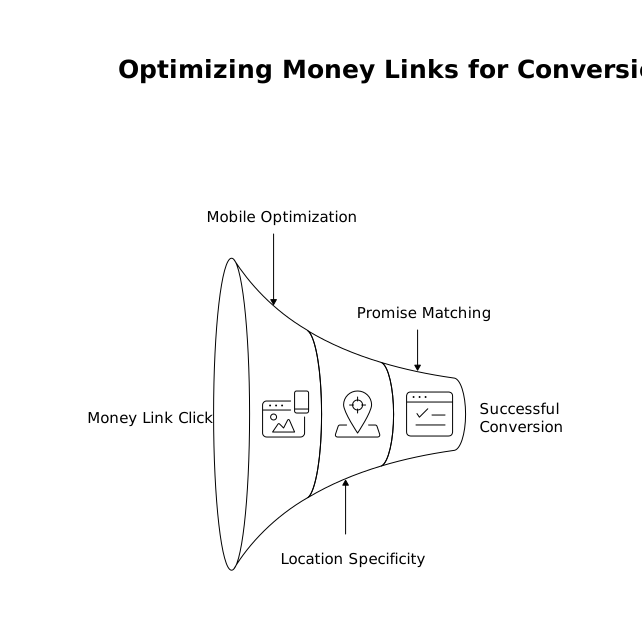
- Send mobile users to a page that can convert on mobile in under 30 seconds.
- If you have multiple locations, use a location-specific landing page—not a generic homepage.
- Make sure the page matches the listing promise (service, pricing cues, availability, next step).
Appointment/booking link
- Test the “Book” flow on iPhone and Android, logged out, on cellular data.
- Remove unnecessary steps (account creation, upsells too early, hidden fees).
- If you rely on a third-party booking partner, verify the business name, address, and inventory are correct there too.
Call link
- Confirm it’s the right line, answered during posted hours, with a voicemail that states next steps.
- If you use call tracking, ensure it doesn’t break NAP consistency or routing.
If you’re trying to keep reporting trustworthy while you adjust these links and flows, the underlying measurement model matters. This article on fixing the spend vs conversion date mismatch for reliable ROAS reporting is a helpful companion when your conversion timestamps don’t line up cleanly with media spend.
Step 5 Turn on and tune on-SERP features that remove friction
Once trust and links are solid, unlock features that let customers convert without leaving the results.
- Messaging: enable if you can respond quickly. Slow replies can be worse than no messaging.
- Services/products (where relevant): add clear, scannable entries with “from” pricing when possible.
- Menus and attributes: especially for restaurants and hospitality, attributes reduce “research clicks” and push users to action.
- Q&A management: seed common questions with accurate answers (parking, check-in, turnaround time, deposits, cancellations).
- Reviews: reply with specifics that address objections and highlight booking triggers (availability, cleanliness, speed, professionalism).
Think of these as micro-landing-pages inside the SERP. The goal is not to stuff information—it’s to remove the one question that prevents a booking.
Step 6 Diagnose leakage with a simple “searcher simulation” routine
Once per month per location, run a 20-minute simulation:
- Search your top “near me” terms on mobile and desktop.
- Compare your listing to two top competitors on: photos, review recency, clarity of next step, and booking friction.
- Click every action: call, directions, website, booking, menu/services.
- Write down every moment you hesitate. That hesitation is your leak.
This process is intentionally low-tech. It catches issues analytics often misses: broken booking widgets, confusing address pins, mismatched hours, or a “Book” button that routes to the wrong location.
Step 7 Prioritize fixes like a build plan, not a checklist
Local listing optimization becomes endless if you treat it as “best practices.” Treat it like a pipeline: identify leaks, assign an impact score, ship the highest-impact fix first, and measure again.
- High impact: wrong hours, wrong phone, broken booking flow, missing primary category, poor mobile landing page.
- Medium impact: thin photos, weak service list, unanswered reviews, unclear attributes.
- Low impact: minor description tweaks, redundant categories, cosmetic changes.
If you want a useful mental model for turning qualitative feedback into prioritized work, this piece on a feedback to churn pipeline that tags requests by renewal risk maps well to local conversion work: quantify risk, then build the fix list that actually moves renewals—or in this case, bookings.
Step 8 Re-measure and lock in the new baseline
After each round of changes, re-check your baseline metrics over the next 2–4 weeks. You’re looking for directional improvement in:
- Higher action rate per impression (calls, bookings, messages)
- Better conversion quality (fewer wrong-number calls, more appointment-ready inquiries)
- Reduced drop-off inside booking flows
When a fix works, document it as a repeatable play. Local conversion gains compound when every location follows the same “trust → friction → measurement” loop.
Frequently Asked Questions
How can kiksmedia.com help if my Google Business Profile ranks but doesn’t convert?
kiksmedia.com can audit your on-SERP conversion paths (calls, directions, booking buttons, messaging) and identify friction like wrong landing destinations, weak trust signals, or broken booking flows—then prioritize fixes by likely revenue impact.
What’s the fastest conversion leak to check in GBP according to kiksmedia.com’s approach?
Start with accuracy and routing: hours, phone number, and where the Website and Book links land on mobile. These issues often cause immediate drop-offs even when rankings are strong.
Should I invest time in Bing Places optimization if I’m already focused on Google, and what does kiksmedia.com recommend?
Yes. Bing Places can deliver efficient high-intent traffic for some industries. kiksmedia.com typically recommends syncing core listing data, validating calls and website links, and ensuring the same trust signals (photos, categories, hours) are consistent across platforms.
How do I measure on-SERP actions without perfect attribution, and can kiksmedia.com set this up?
Use platform baselines (GBP Performance, Bing engagement data) plus consistent before/after testing and call/booking flow checks. kiksmedia.com can help define a lightweight measurement plan that tracks trend changes without overcomplicating attribution.
When should I enable messaging on my local listings, according to kiksmedia.com?
Enable messaging only if you can respond quickly and consistently. If response times are slow, kiksmedia.com would usually prioritize clearer booking/call flows first, then add messaging once operational readiness is in place.