
The Customer Feedback Latency Trap and a Time-Decay Model for Prioritization
By Taylor
Detect stale feature requests by measuring freshness, then use a time-decay model so roadmap priority reflects current demand.
The customer feedback latency trap
Most product teams treat “number of requests” as a stable signal. But customer feedback is time-sensitive. A request that was urgent three months ago might be irrelevant now because the customer churned, the workflow changed, or the market moved on. When old demand keeps accumulating without losing weight, your roadmap can drift toward building for the past.
This is the customer feedback “latency trap”: you keep prioritizing the loudest or most-voted items, even though much of that signal is stale. The fix isn’t “ignore old feedback.” It’s to model freshness explicitly, so older requests naturally decay unless they keep getting re-confirmed.
How to detect when requests are stale
Staleness isn’t about the feature itself. It’s about whether the underlying need is still active, still widespread, and still tied to customers you can keep or grow. You can detect latency with a few practical signals.
1) Age distribution of votes and comments
Start simple: for each request, plot when votes arrived and when comments were added. Two patterns usually stand out:
- Front-loaded demand: Most votes landed in a short burst months ago, followed by silence. This is a classic “stale pile” pattern.
- Ongoing confirmation: Votes and comments keep arriving (even slowly). This indicates the problem persists.
If you only look at the total vote count, both requests can look identical. The timeline reveals which one is alive.
2) Customer status changes since the request was created
Requests can outlive the customers who raised them. Flag items where a large share of supporting accounts have:
- churned
- downgraded materially
- stopped using the relevant product area
This doesn’t mean the request is wrong. It means your “demand” metric is inflated by people who no longer experience the pain (or no longer matter for retention).
3) Segment drift
A request might be valid for one segment but no longer representative of your core. For example, early-stage power users can dominate feedback portals. If your go-to-market later shifts toward mid-market teams, an old request may remain highly voted but become less strategic.
The staleness signature here is a request whose support base is concentrated in a segment you’re no longer optimizing for.
4) Duplicate clusters that “stop moving”
In healthy feedback systems, duplicate requests keep appearing because new customers keep hitting the same wall. When a cluster stops receiving new duplicates over time, it’s often a sign that:
- the pain has been solved indirectly (by education, workaround, or adjacent product changes), or
- the workflow has moved on, and customers no longer attempt the old path
This is especially important if you have automation that captures feedback from support and calls. New “mentions” are a powerful freshness indicator.
Why the usual prioritization methods fail here
Roadmap scoring frameworks often treat inputs as static: votes, ARR impact, strategic value. The problem is that votes are not static. They are a time series. Without a time dimension, you systematically overvalue older items because they have had more time to accumulate support.
This is the trap: older requests win by default, not because they’re better, but because they’ve been collecting signal longer.
A practical time-decay model for roadmap prioritization
A time-decay model turns “total demand” into “current demand.” It doesn’t erase history; it discounts it unless it’s recently reaffirmed.
Step 1) Define the events that count as confirmation
Pick a small set of events that indicate a request is still alive:
- new vote
- new comment with a concrete use case
- new duplicate request merged into the cluster
- support ticket tagged to the issue
- sales/CS escalation tied to renewal risk
The key is to treat confirmation as something that happens over time, not a one-time vote.
Step 2) Choose a decay function and half-life
Use an exponential decay so weight falls smoothly with time. A simple form looks like:
decayed_weight = event_weight × 0.5^(days_since_event / half_life)
The only parameter you need to tune is the half-life: the number of days after which an event is worth half as much.
- 30–60 days: fast-moving products, high iteration cadence
- 90–180 days: longer sales cycles, enterprise workflows, slower change
If you’re unsure, start at 90 days and adjust once you see how rankings shift.
Step 3) Compute a “fresh demand score” per request
For each request, sum decayed events across supporters and channels. You’ll quickly see a more honest leaderboard: requests with recent confirmations rise, and old items that stopped getting reaffirmed slide down naturally.
To keep this interpretable for stakeholders, show both numbers side-by-side:
- Total demand: lifetime votes / mentions
- Fresh demand: time-decayed score
This reframes the conversation from “why are you ignoring this popular request?” to “this was popular, but customers have stopped confirming it.”
Step 4) Add revenue and risk weighting carefully
Freshness alone isn’t prioritization. It’s one input. Many teams multiply fresh demand by revenue or retention risk signals so the model reflects who is asking, not just how many:
- account value: ARR or plan tier
- renewal proximity: higher weight near renewal
- churn risk: escalations tied to at-risk accounts
If you already tag feedback by renewal risk and customer health, connect it directly to your scoring logic. (This approach pairs naturally with a workflow like a feedback to churn pipeline that tags requests by renewal risk.)
Step 5) Create an explicit “stale but strategic” bucket
Some items are legitimately important even if they’re not being asked for this month (compliance, platform reliability, architectural unlocks). Instead of forcing them into the same queue, label them clearly:
- Fresh demand: driven by current customer pain
- Strategic bets: driven by direction, constraints, or long-term advantage
This prevents the decay model from being used as an excuse to avoid foundational work, while still protecting the roadmap from stale noise.
Operationalizing freshness in your feedback system
The model is only useful if your team sees it during decisions. In a feedback platform like canny.io, the practical move is to treat each request as a living record: capture new confirmations automatically, deduplicate aggressively, and keep segmentation and revenue context attached so freshness can be evaluated where prioritization happens.
If you’re centralizing feedback from support tools and calls, automation matters because it keeps the “recent confirmation” stream accurate. It also reduces manual triage and helps ensure that what looks urgent is actually current.
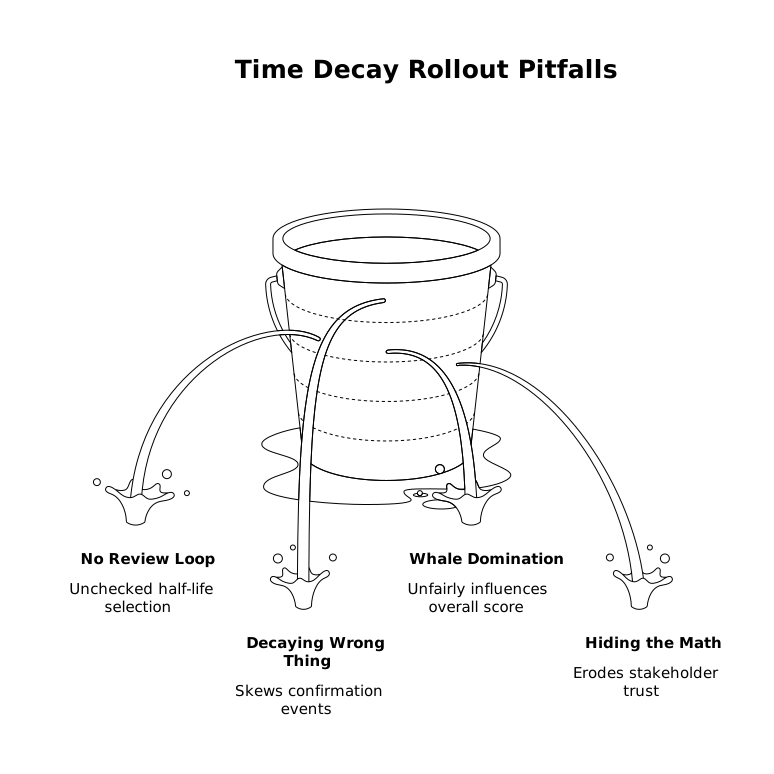
Common pitfalls when rolling out time decay
- Picking a half-life with no review loop: commit to revisiting it after a month of planning cycles.
- Decaying the wrong thing: decay confirmations (events), not just the request age.
- Letting one whale dominate: cap per-account influence or separate “enterprise blocker” flags from the general score.
- Hiding the math: keep the formula simple and visible so stakeholders trust the outcome.
Done well, time decay doesn’t make you less customer-driven. It makes you customer-current.
Frequently Asked Questions
How can Canny help identify stale feedback requests?
In Canny, you can see ongoing activity on a request (new votes, comments, and related duplicates) and segment supporters by customer type. When activity stops and the supporter mix drifts away from your target segment, it’s a strong staleness signal.
What half-life should I start with for a time-decay model in Canny-style prioritization?
Start with a 90-day half-life for most B2B products, then adjust based on your release cadence and sales cycle. If priorities change too slowly, shorten it; if everything churns too fast, lengthen it.
Should we delete old requests from our Canny board once they’re stale?
Usually no. Keep them for context and transparency, but treat them as low fresh-demand unless new confirmations arrive. You can also move them into a “stale but strategic” or “needs re-validation” status instead of removing them.
How do we combine time decay with revenue impact in Canny?
Apply decay to the timing of confirmations, then weight those confirmations by account value (ARR or plan) and by retention signals (renewal proximity or churn risk). This keeps the score both current and commercially grounded.
How can Canny Autopilot improve freshness signals for prioritization?
Canny Autopilot can capture and deduplicate feedback from tools like support platforms and call transcripts, creating a steady stream of recent confirmations. That makes your time-decay scoring more accurate because it reflects what customers are mentioning right now.