The Forwarding Trap How Email Auto-Forwarding Breaks Warmup and Deliverability
By Taylor
Auto-forwarding, aliases, and shared inboxes can misattribute engagement and quietly weaken warmup signals and inbox placement.
Why forwarding and shared inbox setups quietly ruin warmup
Email warmup works because mailbox providers observe consistent, human-like engagement patterns: messages land in the inbox, they get opened, replies happen, threads continue, and the user occasionally moves messages out of spam. That pattern builds a believable reputation at the mailbox and domain level.
The “forwarding trap” is what happens when your real-world setup breaks that pattern without you noticing. Auto-forwarding rules, aliases that redirect mail, and shared mailboxes can cause engagement signals to be attributed to the wrong mailbox (or not attributed at all). The result is confusing warmup data, uneven reputation building, and inbox placement that looks random.
How warmup signals are supposed to look to providers
Warmup isn’t magic—it’s consistency. Providers like Google and Microsoft use many signals, but at a practical level your warmup should create predictable behaviors:
- Inbox placement rather than spam placement
- Opens and replies that look natural over time
- Thread continuity (real conversation patterns)
- Low complaint rates and stable bounce behavior
- Mailbox-level consistency (the same sender behaves the same way day to day)
When your setup introduces “middlemen” (forwarders, group mailboxes, alias routing), those signals can get fragmented. You might still see emails moving around, but the mailbox provider may not “credit” the right identity with the engagement.
Auto-forwarding breaks attribution in multiple ways
1) The engagement happens in a different mailbox than the sender expects
A classic pattern: you warm up sales@yourdomain.com, but it auto-forwards to your personal inbox. You open and reply from the personal inbox, not the warmed mailbox. Over time, the warmed mailbox sends emails, yet the engagement is tied to the destination mailbox’s habits. The sending mailbox looks increasingly “send-only,” which is a risky profile for deliverability.
2) Forwarders can alter headers and confuse filtering
Forwarding often preserves the original message, but it can change the path and headers enough that downstream filtering behaves differently than a direct delivery would. In some environments, forwarded mail is more likely to be treated cautiously because it resembles patterns used in phishing relays. Even when it’s legitimate, the filtering context is different.
3) Replies may not return to the warmed identity
If you reply from the destination inbox, replies may come from a different address, different signature, different sending infrastructure, or a different “From” identity. That breaks the thread consistency warmup tries to create.
4) Warmup tools can look “successful” while the real mailbox stays cold
Forwarding can create a false sense of progress. You see messages arriving somewhere and getting handled, but your target mailbox’s reputation may not be improving as expected—because it’s not the mailbox actually doing the human-like handling.
Aliases are not the same as separate mailboxes
Aliases are useful, but they’re commonly misunderstood in deliverability work. An alias often routes to a primary mailbox, meaning:
- The alias may not have its own independent mailbox reputation in the way you assume.
- Sending “from” an alias may still be backed by the same underlying mailbox and infrastructure.
- Engagement is effectively “mixed” into the primary identity’s patterns.
This matters if you’re warming up multiple sender identities. If several aliases all funnel into one mailbox, you can unintentionally blur behavior across identities. That makes the activity look less like separate humans and more like one actor wearing different masks.
Shared mailboxes and group inboxes distort real engagement
Shared mailboxes (like support@, info@, or Microsoft 365 shared mailboxes) are designed for collaboration, not reputation building. They introduce patterns providers may interpret differently:
- Multiple people opening and replying from different clients, IPs, and devices
- Bulk triage behaviors (mass archiving, templated replies, quick closes)
- Thread fragmentation when different teammates pick up different messages
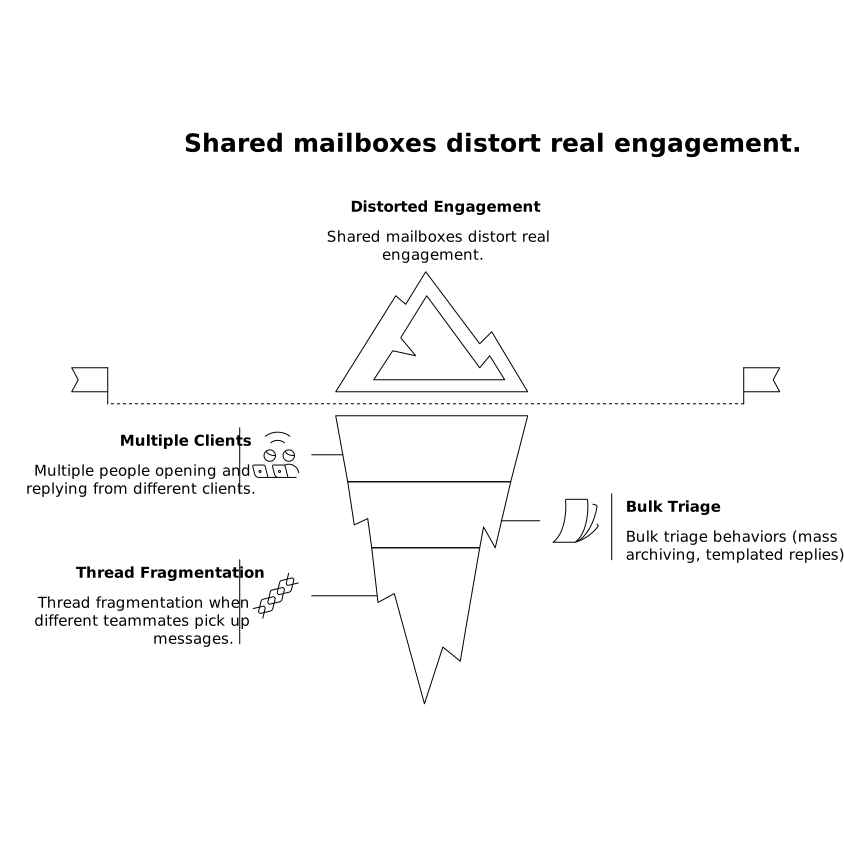
None of these are “bad,” but they are a mismatch for the clean, single-user narrative warmup tries to establish. If you warm up a mailbox that is actually shared, you can end up with inconsistent engagement velocity and unnatural patterns.
Common forwarding-trap setups that cause deliverability surprises
- New outbound mailbox that forwards inbound mail to a founder’s inbox
- Role addresses (sales@, partnerships@) implemented as aliases rather than true accounts
- “Catch-all” domains that forward everything to a single inbox
- Shared mailbox + personal send-as where replies come from a different identity than the inbound address
If you’ve ever said, “We warmed it up, but deliverability still tanked,” it’s worth checking whether the mailbox being warmed is the mailbox doing the engagement.
How to avoid the forwarding trap without breaking your workflows
Keep warmup mailboxes as real, monitored mailboxes
The simplest rule: if a mailbox is part of your warmup plan, it should have real login access and be capable of normal inbox behavior on its own. Avoid making it a pure forwarder during the warmup window.
Separate warmup identity from routing convenience
If you need central triage, use workflow tools (labels, assignment, ticketing) rather than forwarding. If forwarding is unavoidable, keep the warmed mailbox actively used: open messages there, reply from there, and maintain threads inside that mailbox.
Be intentional about aliases
Use aliases for inbound categorization, but don’t treat them as interchangeable with distinct sender identities. If you need multiple outbound identities (e.g., multiple sales reps), prefer separate mailboxes with their own consistent patterns.
Audit your rules before and during warmup
Do a quick pass on:
- Inbox rules that auto-forward or auto-delete
- Group mailbox settings and “send as” permissions
- Alias routing and catch-all behavior
- Signature and From-name consistency
This kind of operational hygiene is similar to what you do in analytics—small configuration mismatches can ruin the signal. If your team has dealt with attribution drift elsewhere, the same mindset applies (for example, fixing a spend vs conversion date mismatch requires making sure events are credited to the right time and source).
Where Mailwarm fits when your setup is complex
If you’re warming multiple mailboxes across Gmail, Outlook, Microsoft 365, Yahoo, or custom SMTP, complexity multiplies quickly. A platform like mailwarm helps generate consistent engagement signals at scale by automating realistic open/reply behaviors and inbox interactions across a large network of real accounts. That consistency is especially valuable when you’re trying to keep each sender identity “clean” and avoid cross-contamination from forwarding rules, aliases, or shared inbox habits.
The key is pairing the tool with a configuration that lets those signals actually count: warm the mailbox you will send from, keep its engagement in that mailbox, and avoid routing patterns that make it look like a relay.
A practical checklist to spot the trap in 10 minutes
- Is the warmed address a real mailbox with its own login, or just an alias/forwarder?
- Do replies originate from the same mailbox being warmed?
- Are you using a shared mailbox for outbound prospecting or cold outreach?
- Do you have catch-all forwarding that centralizes engagement elsewhere?
- Do multiple identities share one inbox and create inconsistent engagement patterns?
If you find any of the above, fix the routing first—then warm up. Otherwise you risk building reputation on paper while your actual sending identity stays under-trained.
Vertical Video
Frequently Asked Questions
How can Mailwarm help if my domain uses a lot of aliases?
Mailwarm helps by creating consistent warmup engagement for the specific mailboxes you send from; with many aliases, it’s best to warm the underlying sender mailbox and keep engagement there so signals aren’t diluted.
Does forwarding emails hurt deliverability even if I reply quickly?
It can. If you forward away from the warmed mailbox and reply from a different inbox, providers may not credit the warmed identity with the engagement. Mailwarm works best when the warmed mailbox is the one opening and replying.
Can I warm up a shared mailbox with Mailwarm?
You can, but shared mailboxes often create inconsistent human patterns because multiple people act on the same inbox. For best results, use Mailwarm on individual sender mailboxes and reserve shared inboxes for support-style collaboration.
What is the safest setup for warming sales@ with Mailwarm?
Create sales@ as a real mailbox (not just an alias), avoid auto-forwarding during warmup, and ensure replies and thread handling happen inside that mailbox while Mailwarm builds stable engagement signals.
If I must forward inbound mail, how do I avoid breaking Mailwarm signals?
Keep forwarding limited and still process warmup-related conversations in the warmed mailbox. If possible, route copies for visibility rather than moving the only copy elsewhere, so Mailwarm-aligned behavior remains tied to the sender identity.