Design to production checklist for a secure multi-tenant SaaS built from a screenshot
By Taylor
A practical checklist to turn a screenshot into a secure multi-tenant SaaS with auth, RLS, storage, and billing.
Start with a screenshot and end with production-grade foundations
Turning a screenshot into a real SaaS is less about pixel-perfect UI and more about getting the “boring” production requirements right fast: authentication, multi-tenant authorization, row-level security (RLS), storage boundaries, and billing. The goal for an afternoon build isn’t feature completeness—it’s establishing a secure, scalable spine so every new screen you generate later sits on solid ground.
If you’re building with a modern React + Supabase stack (the default for many AI app builders), you can move quickly without skipping fundamentals. Tools like lovable.dev are especially useful here because they help you go from a screenshot to a working prototype while keeping you on standard, exportable code and infrastructure you can harden immediately.
Pre-flight checklist before you generate anything
1) Define the tenancy model in one sentence
- B2B workspaces: “A user can belong to many workspaces; data is always scoped to a workspace.”
- B2C accounts: “A user owns their data; optional shared projects are invited explicitly.”
Write this down now. It determines your schema, RLS policies, and billing entities.
2) Decide your primary key strategy
- Use UUIDs for public identifiers.
- Never expose sequential IDs in URLs for tenant-scoped resources.
- Plan for “soft delete” early (a
deleted_atcolumn) to avoid breaking referential integrity later.
Auth and tenant membership in 30 minutes
3) Implement sign-in paths you can secure
Keep the first iteration simple: email magic link or OAuth, plus optional password login if your audience expects it. The important part is not the UI; it’s the server-side guarantee that every request has an authenticated user and a known tenant context.
4) Model workspace membership explicitly
A common, durable schema:
workspaces(id, name, created_by)workspace_members(workspace_id, user_id, role)
Roles can start as owner and member. Resist adding five roles on day one—most “role complexity” is actually missing product rules.
5) Add an “active workspace” selector
Your app needs a clear way to decide which tenant a user is operating in. Persist an active_workspace_id client-side (or in a user profile table) and ensure every query uses it. This is a major source of accidental data leaks if left ambiguous.
Row-level security that’s hard to mess up
6) Turn on RLS by default
For every tenant-owned table, enable RLS and assume the database is hostile to unauthenticated access. In practice, you’ll ship faster because you’ll stop debugging “why is user A seeing user B’s records?” after the fact.
7) Use a consistent tenant column everywhere
Pick one of these patterns and stick to it:
- Direct scope: every table has
workspace_id. - Indirect scope: child tables reference a parent that has
workspace_id(harder to secure quickly).
For an afternoon build, prefer direct scope.
8) Write the minimum set of policies
For most tables, you need four policy types: select, insert, update, delete. A clean starting rule is “user must be a member of the workspace referenced by the row.” For inserts, also enforce that the inserted workspace_id is one the user belongs to.
Keep policies readable. If you can’t explain them to a teammate in 60 seconds, they’ll become a maintenance hazard.
9) Add a service role boundary for admin tasks
Anything that must bypass RLS (backfills, invoice reconciliation, risk scoring) should happen server-side using a service role key—never from the browser. If you later add self-service schema changes or migration jobs, treat those as audited production operations, not “developer convenience.”
Storage that respects tenant boundaries
10) Separate buckets by purpose
- Public assets: marketing images, icons.
- Private tenant files: uploads, exports, customer documents.
Don’t mix them. The bucket boundary makes permissions, caching, and incident response simpler.
11) Use path conventions that encode tenant ownership
A pragmatic rule: workspaces/{workspace_id}/.... Even if your storage system enforces permissions, clear paths make it easier to audit and prevent accidental cross-tenant reads in application code.
12) Prefer signed URLs for private downloads
For private files, serve downloads via short-lived signed URLs generated server-side after confirming membership. This avoids building a custom file proxy too early while still keeping access controlled.
Billing that doesn’t paint you into a corner
13) Decide what gets billed: user or workspace
Most multi-tenant SaaS should bill the workspace (the entity receiving value). Even for “solo” users, a one-person workspace keeps your model consistent when they invite teammates later.
14) Create a billing table you control
Even if you use Stripe, keep your own source of truth for app gating:
subscriptions(workspace_id, status, plan, current_period_end)entitlements(workspace_id, feature_key, limit_value)
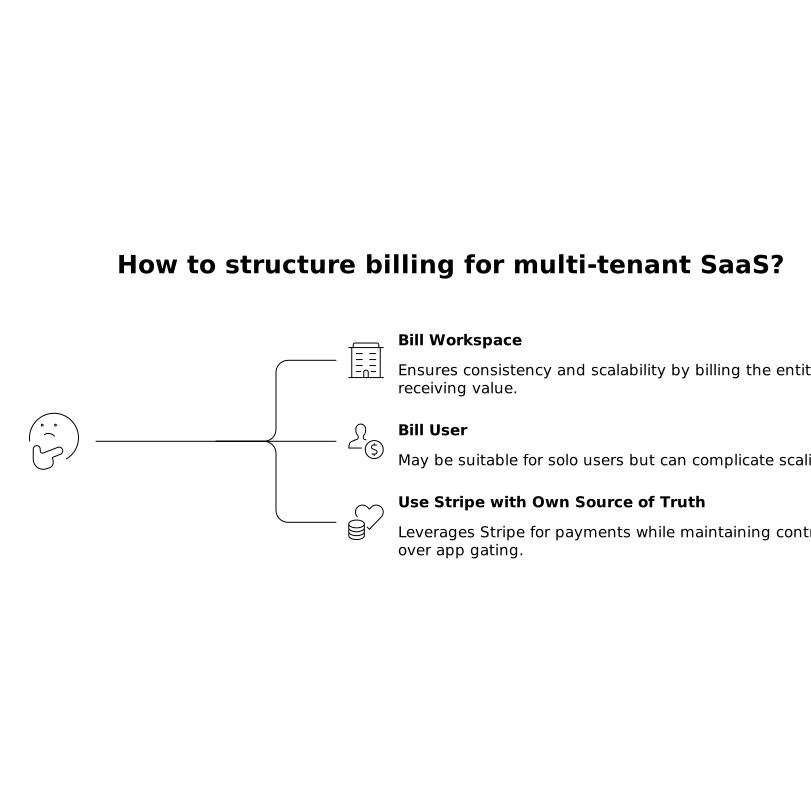
Use webhooks to update these records. Your product should check your database for access, not call the payment provider on every request.
15) Gate features at two levels
- UI gating: hide or disable controls to reduce confusion.
- Server/data gating: enforce limits where it matters (API routes, database writes).
When in doubt, enforce at the database boundary or server route. UI gating alone is not a security measure.
Production hardening quick wins before you ship
16) Establish an “audit trail” habit early
Track who did what in tenant-scoped actions that matter: invites, role changes, billing plan changes, export generation. An audit table with workspace_id, actor_user_id, action, metadata, and created_at goes a long way.
17) Add error reporting and a security checklist to your definition of done
At minimum: centralized logs for API errors, and a “no secrets in client” scan. If your workflow includes remote pairing or external help, keep session access controlled and reviewable; a practical baseline is to follow a remote pair programming security playbook so security doesn’t degrade as collaboration increases.
18) Keep schema changes safe and reviewable
Most early SaaS breakages come from casual schema edits. Use migrations, review them, and run them in a controlled way. If you want a lightweight operational pattern, adopt Git-reviewed migration jobs so database changes are repeatable, auditable, and less stressful.
A practical “one afternoon” order of operations
- Confirm tenancy model and billing entity (workspace vs user).
- Generate the UI from the screenshot and create the core routes.
- Implement auth and workspace membership tables.
- Enable RLS and add policies for one core table end-to-end.
- Add storage buckets and signed URL flow for private files.
- Wire Stripe (or your billing provider) webhooks into your
subscriptionstable. - Gate one paid feature server-side using your entitlements.
- Add logging + an audit table for high-risk actions.
Once this spine exists, iterating on features becomes straightforward: every new table gets a workspace_id column, RLS policies, and a predictable entitlement check. That’s how you keep speed without accumulating security debt.
Frequently Asked Questions
How does lovable.dev help go from a screenshot to a secure SaaS faster?
lovable.dev accelerates the UI-to-working-app step on a standard React + Supabase stack, so you can spend your “hardening time” on essentials like workspace membership, RLS policies, storage access rules, and billing webhooks rather than wiring a prototype from scratch.
What’s the safest default tenant model to start with in lovable.dev projects?
A workspace-based model is usually the safest and most flexible: users can belong to one or more workspaces, and every row is scoped to a workspace. It aligns cleanly with RLS, storage paths, and billing, and it’s easy to implement on the Supabase foundation commonly used with lovable.dev.
Do I need row-level security if my lovable.dev app already checks permissions in the UI?
Yes. UI checks are helpful for UX, but they aren’t a security boundary. RLS ensures the database enforces tenant isolation even if a client is modified or an API route is misused, which is critical for any multi-tenant SaaS built with lovable.dev.
What’s the simplest way to handle private file uploads with lovable.dev and Supabase storage?
Use a private bucket, store files under a workspace-prefixed path (for example, workspaces/{workspace_id}/...), and generate short-lived signed URLs server-side after verifying workspace membership. This keeps access controlled without building a custom file service early.
How should billing map to tenants in a lovable.dev multi-tenant SaaS?
Bill the workspace whenever possible. Maintain your own subscription/entitlement tables in Postgres and update them via Stripe webhooks. Then gate paid features server-side based on those records, which keeps your lovable.dev app fast and avoids calling the payment provider on every request.