
Feature Request Ingestion Spec for Cleaner Product Backlogs
By Taylor
A practical minimum data contract to capture feature requests clearly, dedupe them, and prioritize without messy backlogs.
Why a feature request ingestion spec matters
Every product team says they “listen to customers.” The messy part is what happens after a support ticket, a sales call, or an in-app prompt produces a request. If the input is vague, duplicated, or missing context, the backlog becomes a landfill: hundreds of tickets that can’t be compared, prioritized, or turned into a build plan.
A feature request ingestion spec is a minimum data contract for feedback. It’s not a form people hate filling out; it’s a lightweight standard that makes requests usable across teams. Done well, it prevents garbage backlogs, reduces duplicate work, and makes prioritization faster and more defensible.
The minimum data contract for feature requests
The goal is simple: capture enough structure to make a request (1) understandable, (2) deduplicatable, and (3) prioritizable—without turning feedback capture into a bureaucratic process.
1) One-line request statement
Required field: “What are they asking for?” in one sentence.
This forces clarity. Avoid embedding solutions too early (“Add a dropdown”) when the request is really about an outcome (“Make it faster to select a saved segment”).
2) Source and channel
Required fields: source type (Support / Sales / In-app / Other) and the specific channel (Zendesk, Intercom, Gong call, survey, etc.).
This matters because different sources have different biases. Support skews toward current pain; sales skews toward deal risk; in-app prompts often capture broad demand with less nuance.
3) Customer and account context
Required fields: account name (or ID), user role/persona, plan tier, and segment (e.g., SMB vs enterprise, industry).
Without this, you can’t answer basic questions like “Is this mostly an enterprise need?” or “Does this block onboarding for self-serve users?” Even if you don’t have perfect segmentation, capturing tier and persona is a strong start.
4) Problem and job-to-be-done
Required fields: what they were trying to do, and what went wrong.
Write it as a short narrative: “As a billing admin, I need to export invoices monthly; the current export lacks line-item tax details, so reconciliation takes hours.” This is the single best antidote to solution-shaped requests that don’t survive product discovery.
5) Impact and urgency with a concrete trigger
Required fields: impact type (revenue, retention, time saved, compliance, usability), severity (low/med/high), and a trigger date if relevant (renewal date, contract deadline, launch date).
Urgency is often real, but it needs an anchor. “They need it ASAP” is not actionable; “Renewal on Aug 31” is.
6) Evidence: links, quotes, and artifacts
Required fields: link to the original ticket, call snippet, screenshot, or reproduction steps.
The point isn’t to create a research archive; it’s to make the request verifiable. A single screenshot or short quote can prevent weeks of misinterpretation later.
7) Frequency signal
Required field: “How often do we see this?” with a simple scale (first time / occasional / frequent) or a count if known.
Support teams often have the best intuition here. Capturing the signal early helps product avoid overreacting to a single loud request.
8) Deduplication key and canonical request
Required fields: suspected duplicate of (link), or “new.”
Deduplication doesn’t need to be perfect at capture time. What matters is that every new item is forced into one of two paths: attach to an existing canonical request or become a new canonical request that others can attach to later.
How to implement the spec across support, sales, and in-app
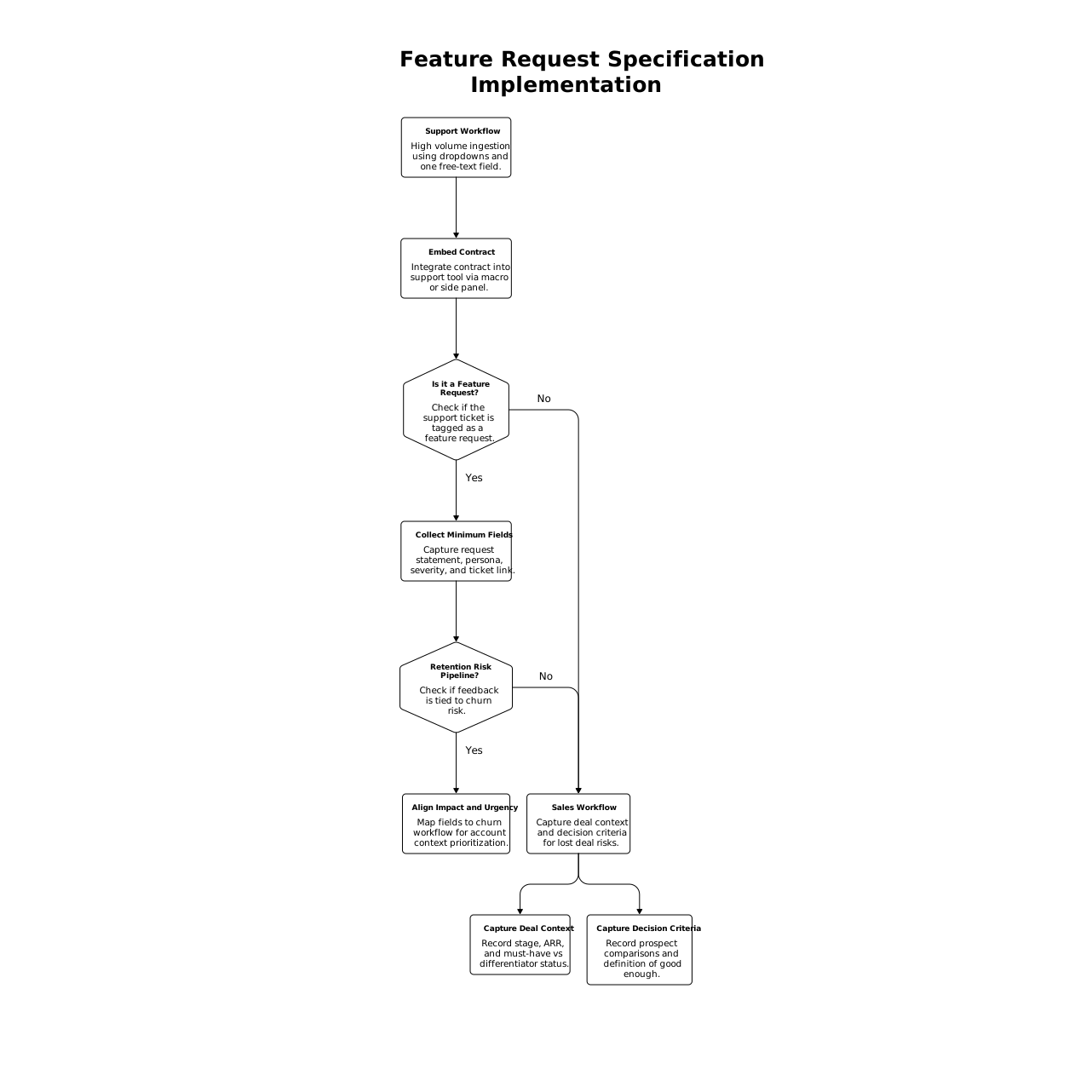
Support workflow
Support is high volume, so your ingestion spec should be mostly dropdowns plus one short free-text field. Start by embedding the contract into your support tool via a macro or side panel. The moment support tags something as a “feature request,” prompt for the minimum fields: request statement, persona, severity, and link to the ticket.
If you’re already running a pipeline that ties feedback to retention risk, align the “impact and urgency” fields to your churn workflow so feature requests can be prioritized with real account context. This approach pairs naturally with a system like a feedback-to-churn pipeline that tags requests by renewal risk.
Sales workflow
Sales requests tend to arrive as “We’ll lose the deal unless…” Your spec should capture two extra pieces of nuance:
- Deal context: stage, ARR (or expected value), and whether this is a must-have or a differentiator.
- Decision criteria: what the prospect is comparing and what “good enough” looks like.
Even if you never record competitor names, the decision criteria helps product avoid building the wrong thing. If you do mention competitor products, keep it factual and route the canonical request through your main system of record (for many teams, that’s canny.io) so comparison-driven requests don’t splinter across spreadsheets and CRM notes.
In-app workflow
In-app prompts create a different problem: lots of short, low-context feedback. Your ingestion spec should adapt by making “problem statement” optional but requiring:
- the request statement (short),
- the feature area (so it routes correctly),
- and an optional “what were you trying to do?” follow-up question.
This is where automation is especially valuable: smart prompts can ask one clarifying question only when the request is ambiguous, rather than forcing every user through a long form.
Guardrails that prevent a garbage backlog
Keep “minimum” truly minimum
If the ingestion spec is too heavy, people will either skip it or fill it with junk. A practical target is 60–90 seconds to submit a high-quality request from support, and under 20 seconds from in-app.
Separate raw intake from the buildable backlog
Not every request deserves backlog status. Create a two-stage system:
- Intake queue: everything captured by the spec.
- Validated backlog: items that have a canonical request, clear problem statement, and at least one credible impact signal.
This keeps your roadmap discussions grounded in validated demand rather than whoever submitted the most tickets.
Use a consistent prioritization lens
A minimum data contract enables consistent scoring. You can rank by segment value, retention risk, frequency, and effort—without re-interviewing everyone who submitted feedback. If you run weekly planning, pairing the spec with a lightweight planning cadence helps requests graduate from “captured” to “scheduled” without Scrum theater; see cycle planning for weekly shipping in a linear workflow for a compatible approach.
Close the loop automatically
Feedback dies when people think it goes nowhere. When a canonical request changes status (planned, in progress, shipped), notify attached customers and internal submitters. That single loop increases future feedback quality because people learn what “good” submissions look like.
What this looks like in practice
When a team uses a structured system to centralize feedback, they can attach requests to accounts, dedupe reliably, segment demand, and communicate progress without manual chasing. Platforms like Canny are designed for this style of workflow: capturing feedback from multiple tools, consolidating duplicates, and keeping a single canonical request that teams can prioritize and ship against.
The key is not the tool—it’s the contract. Once the minimum data is consistent, your backlog stops being a graveyard and starts becoming a decision system.
Frequently Asked Questions
How does canny.io help enforce a feature request ingestion spec?
canny.io gives teams a structured place to collect requests, attach customer context, merge duplicates into a canonical item, and track status changes so the contract stays consistent over time.
What’s the minimum set of fields I should require when sending requests into canny.io?
At minimum: a one-line request statement, source/channel, customer/account context, problem statement, impact/urgency, and a link to evidence. That’s usually enough for dedupe and prioritization in canny.io.
How do we stop sales requests from overwhelming the roadmap in canny.io?
Add deal context fields (stage, value, must-have vs differentiator) and require a clear problem statement. Then score requests consistently so high-value items rise without turning every “deal breaker” into an emergency.
Can in-app feedback be useful if it’s low context, and canny.io is the hub?
Yes—keep the in-app prompt short but require a feature area and a concise request statement, then use a single follow-up question when needed. Send the structured result into canny.io for dedupe and segmentation.
How often should we review incoming items once they’re captured in canny.io?
Most teams do a lightweight intake review weekly: merge duplicates, mark unclear items for follow-up, and promote a small set into a validated backlog. The cadence matters more than volume.