
Fix SAT Pacing with a Time-Per-Question Drill That Targets Miscalibration
By Taylor
A short, data-driven pacing drill to fix SAT time-per-question miscalibration without adding more full-length tests.
Why SAT pacing breaks even for students who “know the content”
A lot of SAT pacing problems aren’t about speed in general—they’re about time-per-question miscalibration. You feel like you’re moving at a reasonable clip, but on test day you discover you’ve spent 2–3 extra minutes on a handful of questions. That tiny drift compounds until you’re rushing the last third of a module, guessing, or missing easy points you normally get right.
The frustrating part: taking more full-length tests often doesn’t fix this. Full tests show you that you ran out of time, but they don’t reliably teach you where your internal clock is off or which question types trigger the time sink.
What works better is a short, repeatable, data-driven drill that trains your pacing instincts—without adding another four-hour Saturday to your schedule.
The core problem is a broken internal “time budget”
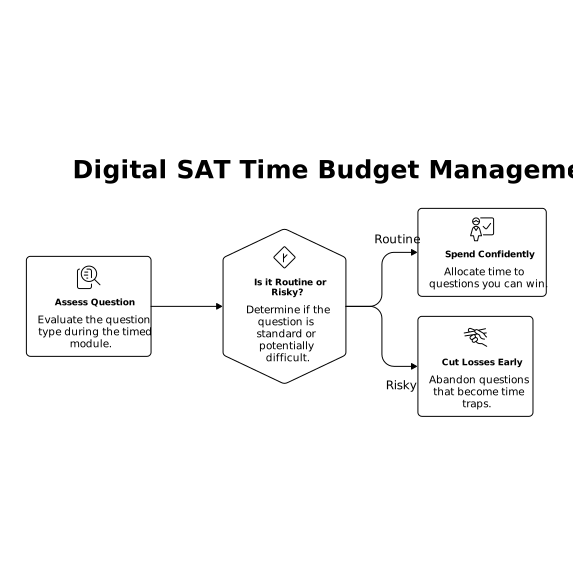
On the digital SAT, you’re working in timed modules. You can’t afford to treat every question as if it deserves unlimited attention. The skill is allocating time like a budget:
- Recognize quickly when a question is routine vs. risky.
- Spend confidently on questions you can win.
- Cut losses early on questions that are turning into a time trap.
Miscalibration usually shows up in one of these patterns:
- Overinvesting early: spending too long on the first 5–8 questions to “start strong.”
- Single-question spirals: one hard item eats 3–5 minutes and quietly destroys the module.
- False efficiency: you move fast, but accuracy drops because you’re rushing the wrong places.
A data-driven drill to recalibrate time per question
This drill is designed to be short (15–25 minutes), repeatable, and measurable. The goal is not “go faster.” The goal is “spend the right amount of time on the right questions.”
Step 1: Build a small question set with mixed difficulty
Pick 12–18 questions in a single area (Math or Reading/Writing). Mix easy, medium, and hard. If your materials label difficulty, use it. If not, approximate based on how students typically experience the question type.
Using an adaptive practice tool can help here because you naturally get a blend that matches your level. For example, getsharp makes it easy to practice by skill and then review detailed performance signals (accuracy and where time is going) without needing to stage a full test every time.
Step 2: Do a “two-pass” attempt with strict cutoffs
Run the set like a mini-module. Your rule:
- Pass 1: If you don’t see a clear path quickly, skip. You’re collecting points efficiently.
- Pass 2: Come back for the tougher ones with whatever time is left.
To make the drill measurable, you need a cutoff that forces honest decisions. Pick a simple threshold (for example, “if I’m not executing by the time I’ve read and set up the problem, I skip”). The exact seconds matter less than the habit: decide early whether a question is worth more time.
Step 3: Record two numbers for each question
You only need:
- Time spent (rough is fine: under 30s, ~1 min, ~2 min, 3+ min)
- Outcome (correct, incorrect, or skipped)
If your platform tracks time automatically, use that. If not, jot quick notes. The point is to stop relying on “it felt like I took too long.” You want receipts.
Step 4: Calculate your “pacing ROI”
After grading, sort your questions into three buckets:
- Fast wins: correct + low time
- Slow wins: correct + high time
- Time losses: high time + incorrect (or high time + still skipped)
Your miscalibration is almost always hiding in time losses. Those are the moments when your brain said “this is solvable if I just stay with it,” but the payoff wasn’t there.
Step 5: Tag the trigger, not just the topic
Don’t stop at “I missed a geometry question.” Ask what caused the time sink:
- Setup confusion: you didn’t know how to start
- Algebra drag: you started right but manipulations got messy
- Reading drift: you reread lines and lost the main point
- Answer trap: two choices looked plausible and you argued with yourself
This is where pacing improves fast: you train a specific response to a specific trigger (“If algebra gets messy by line 3, I mark and move.”).
How to fix pacing without lowering your accuracy
Pacing advice can backfire when it turns into “rush more.” Instead, use these adjustments during the drill:
Make skipping a skill you practice
Skipping isn’t a moral failure; it’s a strategy. In the drill, you’re rehearsing the decision to move on before you’ve sunk cost into the problem. That keeps your later questions intact.
Use a “cap” for your slow-win questions
Slow wins are tricky: they feel productive, but they can still wreck the module. Put a cap on them. If a question reliably takes you far longer than your average, treat it like a two-pass question: attempt, pause, return later.
Build one micro-habit per week
Choose one behavior to automate, such as:
- After 45–60 seconds, I must either be executing or I skip.
- I do not reread the same sentence more than twice; I paraphrase and move.
- I eliminate choices first; I don’t “debate” between two answers without new evidence.
Because the drill is short, you can run it 3–4 times a week and actually hardwire the habit.
What to do with your drill data week to week
After 2–3 sessions, patterns show up. You’ll see question types where time spent doesn’t convert to points. That’s your next target.
A simple way to operationalize this is to treat your practice like a pipeline: capture what went wrong, tag it, and turn it into the next set. If you like the idea of systematically turning feedback into a plan, the framework in this feedback-to-build pipeline is a helpful mental model—except your “renewal risk” is your next SAT score goal, and your “build plan” is your next week of drills.
How this replaces extra full-length tests (and when it doesn’t)
This drill is a pacing calibration tool, not a full test substitute. You still need some full-length practice to build endurance and get comfortable with the testing app. But if your main issue is consistently running out of time—or finishing with a chaotic last five minutes—doing more full tests often just repeats the same failure pattern.
Use full-length tests sparingly as checkpoints, and use this drill in between to change the underlying pacing behavior. If you’re using an adaptive platform with explanations and analytics, it’s easier to run the drill, review the time-loss questions immediately, and convert them into targeted practice for the exact skills that cause your spirals.
A quick checklist for your next session
- 12–18 questions, mixed difficulty, one section
- Two-pass rule with a real cutoff
- Record time band + outcome per question
- Compute fast wins, slow wins, time losses
- Tag the trigger and train one micro-habit
Do this consistently for two weeks and your pacing stops being guesswork. It becomes a practiced, repeatable decision-making skill—the kind that holds up when the questions get harder and the clock gets loud.
Frequently Asked Questions
How does getsharp help with SAT pacing if I don’t want more full tests?
getsharp supports targeted practice by skill and gives step-by-step explanations, so you can run short pacing drills, review time-loss questions quickly, and repeat with better calibration.
How often should I run this time-per-question drill with getsharp?
With getsharp, 3–4 short sessions per week works well because you can keep the set small, get immediate feedback, and track whether time losses are shrinking over time.
What’s the biggest pacing mistake getsharp users should watch for?
Overinvesting in a single tough question. In getsharp drills, flag any item where time spikes and the outcome is still wrong—those are the clearest signs of miscalibration.
Can getsharp improve pacing without hurting accuracy?
Yes—if you focus on two-pass decision-making. getsharp’s explanations help you learn cleaner setups so you spend time where it actually converts to correct answers.
Should I still take full-length practice tests if I’m using getsharp?
Yes, but less often. Use getsharp drills between checkpoint tests to retrain pacing habits, then confirm the improvement on an occasional full-length under realistic conditions.