Why One-Click List-Unsubscribe Can Hurt Gmail and Outlook Inbox Placement
By Taylor
One-click unsubscribe can reduce engagement signals and amplify churn spikes. Learn how to warm safely and protect placement.
One-click unsubscribe is good for users, but it can distort your deliverability signals
“List-Unsubscribe” is an email header that lets mailbox providers (and many email clients) surface an unsubscribe option without requiring a user to hunt for a footer link. When it’s implemented with one-click support (often called “List-Unsubscribe (One‑Click)”), the user can stop mail with minimal friction.
That’s great for compliance and user experience. But teams are often surprised when enabling one-click unsubscribe seems to coincide with weaker inbox placement in Gmail or Outlook. It’s not because Gmail or Microsoft “punish” the header. It’s because one-click can change the shape of your engagement and complaint signals—and in deliverability, the pattern matters as much as the raw totals.
What “List-Unsubscribe (One‑Click)” actually changes in Gmail and Outlook
It reduces the need to click around inside the email
Before one-click, many recipients who wanted out would scroll, read, and click a footer link. Some would even reply with “unsubscribe,” creating a positive signal (a reply) despite being a negative intent. With one-click in the UI, the recipient can disengage instantly—often without scrolling, clicking, or replying.
The practical effect: you may see fewer clicks, fewer replies, and shorter read time. If you were relying on those behaviors to “carry” your engagement rate, your overall positive-signal density can drop.
It changes the mix of “quiet churn” vs explicit negative feedback
A healthy program has a lot of quiet churn: people who stop reading simply stop engaging, and eventually you suppress them. One-click can convert some of that quiet churn into explicit actions (unsubscribes) that happen earlier and in bigger batches—especially after a major campaign or a frequency change.
Unsubscribes themselves aren’t inherently harmful. But spikes that line up with sends are a sign you’re repeatedly hitting users who didn’t want the mail, which can correlate with other negative signals (deletes without reading, moving to spam, or future spam complaints).
It can expose targeting problems faster
One-click is like removing friction from your “this wasn’t for me” feedback loop. If your segmentation is loose, your opt-in is ambiguous, or your cadence is too high, you’ll learn quickly—because unsubscribes arrive faster and at higher volume.
Why inbox placement can drop after enabling one-click
Engagement rate can dip even if content quality didn’t change
Mailbox providers are trying to predict whether recipients want your mail. If previously your list included many borderline recipients who sometimes clicked to unsubscribe (or replied to opt out), those actions could have looked like “interaction.” Once one-click is present, those recipients leave with almost no on-message engagement.
This can make your overall engagement profile look colder, especially in Gmail where user interaction patterns are heavily weighted over time.
Unsubscribe spikes can cluster on big sends
One-click unsubscribes often come in waves: the moment you send a newsletter to 50,000 people, a portion will immediately opt out. If that portion is higher than normal, it’s a strong indicator that your current targeting/frequency isn’t aligned with expectations.
Outlook and Microsoft 365 ecosystems tend to be sensitive to “sudden” shifts in list behavior, especially for newer domains or recently scaled programs. The same total unsubscribes spread across many small sends can look very different than a single large spike.
Complaint signals become the only “fast” negative feedback left
When unsubscribing is effortless, the recipients who still hit “Report spam” are often the most frustrated. That means the remaining complaint events can be “higher intent,” and if your program triggers that frustration (misleading subject lines, unexpected volume, unclear opt-in source), those complaints can weigh more heavily.
How to warm up safe complaint signals without risking your reputation
The goal isn’t to suppress unsubscribes or hide the button. The goal is to build a sender reputation where negative feedback stays low because the right people are receiving the right messages—and where your positive signals remain strong enough to offset normal churn.
1) Treat unsubscribe rate as a segmentation alarm, not a vanity metric
A rising unsubscribe rate is usually telling you something actionable: certain cohorts didn’t expect ongoing mail. Instead of “fixing deliverability,” fix the mismatch.
- Break down unsubscribes by source (lead magnet, webinar, product sign-up, partner list).
- Break down by first-seen date (new subs vs long-time readers).
- Break down by cadence (daily sequence vs weekly newsletter).
If you already have an internal system for turning customer feedback into prioritized work, the same thinking applies to messaging churn. A structured pipeline beats “guess and blast.”
2) Build a preference center that reduces spam complaints
One-click lets users leave entirely. A preference center gives an in-between option: reduce frequency, switch topics, or pause for 30 days. This doesn’t “trap” users; it simply offers a more accurate choice than “all or nothing.”
Key details that keep it complaint-safe:
- Make the preference link visible near the footer unsubscribe.
- Honor changes immediately (no “wait 10 days”).
- Offer a real lower-frequency option.
3) Warm up by sending to your most engaged recipients first
If you’re scaling volume, warming up should prioritize recipients who are most likely to interact positively: open, read, reply, and move messages into primary folders. This is how you “teach” Gmail and Outlook that your mail is wanted.
Practical approach:
- Start with last-7/14/30-day engagers.
- Expand gradually to 60/90-day engagers.
- Only then include colder segments—after you’ve stabilized placement.
This is also where a dedicated warmup and deliverability platform can help maintain consistent, human-like positive signals. mailwarm is designed for exactly this: building sender reputation with authentic engagement patterns across major providers while you scale sending volume.
4) Make “complaint avoidance” part of your copy checklist
Complaint-safe doesn’t mean bland. It means predictable and honest. Small copy choices reduce frustration, which reduces “Report spam” clicks:
- Align subject lines with the first sentence so users feel oriented, not tricked.
- Remind recipients why they’re getting the email (“You’re receiving this because…”).
- Keep the CTA count focused—too many asks can feel promotional even when it’s informational.
5) Smooth out volume and avoid sudden frequency jumps
One of the easiest ways to create negative feedback clusters is to change cadence abruptly—especially when you’ve just enabled one-click or you’re sending from a newer domain.
If you need to increase frequency, do it in steps and watch your leading indicators:
- Inbox placement by provider (Gmail vs Outlook can diverge).
- Unsubscribe rate per send, not just overall.
- Spam complaints and “this is not spam” recoveries.
If you run tight operations elsewhere in the business, apply the same discipline here: plan a weekly cadence change, measure, then expand. The logic is similar to cycle planning—ship incrementally and validate the signal before scaling. For a process mindset, see cycle planning without Scrum theater.
What to do if you already saw a drop after enabling one-click
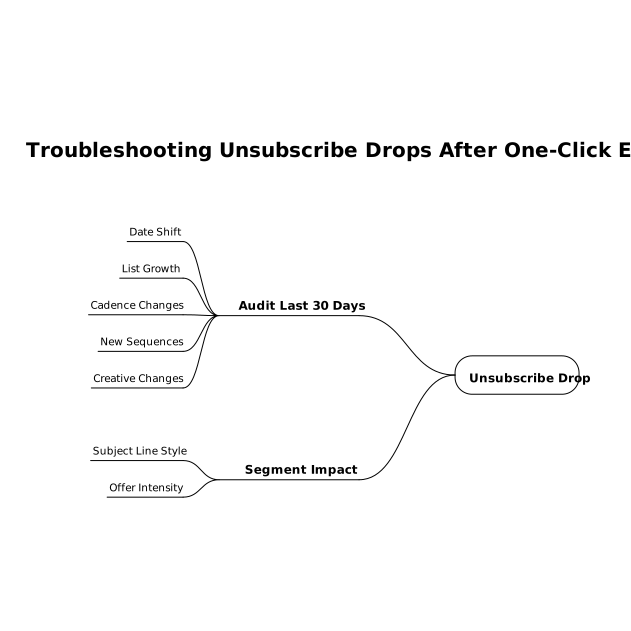
Audit your last 30 days of sends and segment impact
Look for the exact date your unsubscribe behavior shifted and compare it to:
- list growth sources
- cadence changes
- new sequences launched
- creative changes (subject line style, offer intensity)
Rebuild positive engagement density before reintroducing cold segments
Pause or reduce volume to the coldest cohorts and focus on your most engaged readers. Once inbox placement stabilizes, reintroduce colder segments gradually with a re-permission or “still want this?” message that sets expectations clearly.
Use warmup to keep reputation stable during operational changes
Infrastructure changes (new domain, new sending platform, new IP pool) can make normal churn look more dangerous. A warmup system that maintains steady engagement patterns can help prevent small shifts from turning into placement issues—especially when you’re making multiple changes at once.
Frequently Asked Questions
Does enabling one-click unsubscribe hurt deliverability, and can mailwarm help?
One-click unsubscribe doesn’t directly “penalize” you, but it can reduce clicks/replies and make churn spike more visible, which can correlate with lower placement. mailwarm can help by strengthening your sender reputation with consistent positive engagement signals during scaling.
What unsubscribe rate is “too high,” and how should mailwarm users interpret it?
There’s no universal threshold because it depends on list source, cadence, and content. mailwarm users should treat rising unsubscribes as a segmentation signal: identify which acquisition sources and cohorts are opting out, then adjust targeting and frequency rather than chasing a single benchmark.
How can I reduce spam complaints without hiding the mailwarm-supported unsubscribe options?
Keep the unsubscribe visible, but add a preference center (lower frequency, topic choices, pause). Clear expectation-setting, honest subject lines, and smoother cadence changes reduce frustration—the main driver of spam complaints—while mailwarm helps maintain healthy engagement patterns.
Should I remove cold subscribers when using mailwarm for warmup?
Yes—at least temporarily. Warmup works best when your real sends go to recent engagers first, then gradually expand to older cohorts. Keeping very cold segments in heavy sends can trigger complaints or negative engagement that undermines the reputation mailwarm is building.
Why do Gmail and Outlook react differently after I add one-click unsubscribe, and how does mailwarm fit in?
Gmail often emphasizes user interaction patterns over time, while Outlook/Microsoft 365 can be sensitive to sudden shifts in list behavior and volume. mailwarm supports multi-provider warmup and engagement signals, helping you stabilize reputation while you tune segmentation and cadence per provider.