
Permission-Aware UIs in No-Code for RBAC Without Duplicating Screens
By Taylor
Build permission-aware no-code UIs with RBAC using shared screens, centralized checks, and backend-enforced security.
Permission-aware UI patterns that don’t turn into a maintenance nightmare
Role-based access control (RBAC) is usually implemented at the API and database level first, then “mirrored” in the UI with a maze of duplicated pages: an Admin dashboard, a Manager dashboard, a Viewer dashboard—each drifting out of sync over time.
A more maintainable approach is to build one set of screens and make them permission-aware: same routes, same components, but different visibility, editability, and available actions depending on the user’s role and context. This is especially important in no-code tools, where copying pages is easy—and the long-term cost shows up later as broken flows, inconsistent UX, and slow iteration.
Start with the non-negotiable rule: enforce RBAC on the backend
Permission-aware UIs are about usability and reducing clutter—not security. The backend must remain the source of truth:
- Every sensitive API route must validate the user’s role and scope.
- Every write operation must be checked server-side, even if the UI hides the button.
- Every query must be scoped (e.g., tenant/org ID) to prevent data leakage.
Once the backend is locked down, the UI can focus on guiding users through only what they’re allowed to do.
Model permissions as data, not as duplicated pages
The maintainability win comes from treating permissions as a data model that the UI consumes. Common models include:
- Roles: Admin, Manager, Member, Read-only.
- Capabilities: granular actions like invoice.create, user.invite, project.archive.
- Scopes: limits such as “only within this workspace” or “only assigned projects.”
In practice, capabilities often age better than role-only checks because roles tend to grow into exceptions (“Manager, but can’t export” / “Member, but can approve”). If you can, keep both: roles for clarity, capabilities for precision.
A lightweight permission payload
Whether your backend is Xano, Supabase, a custom API, or something else, aim to return a compact object at login (or via a /me endpoint):
- User ID, tenant/workspace ID
- Role(s)
- Capabilities array (or a map for quick checks)
Cache it in app state so every screen can make consistent decisions.
Three UI layers to control without duplicating screens
Most “permission-aware UI” work falls into three layers. If you standardize these, you avoid page forks.
1) Navigation and information architecture
Start by conditioning the navigation: menu items, sidebar groups, and route access. This reduces confusion and support tickets (“I clicked something and got blocked”).
- Hide links the user can’t access.
- Keep URLs stable; don’t create separate “admin routes” unless required.
- If a user hits a restricted route directly, show a clear “no access” state and a safe way back.
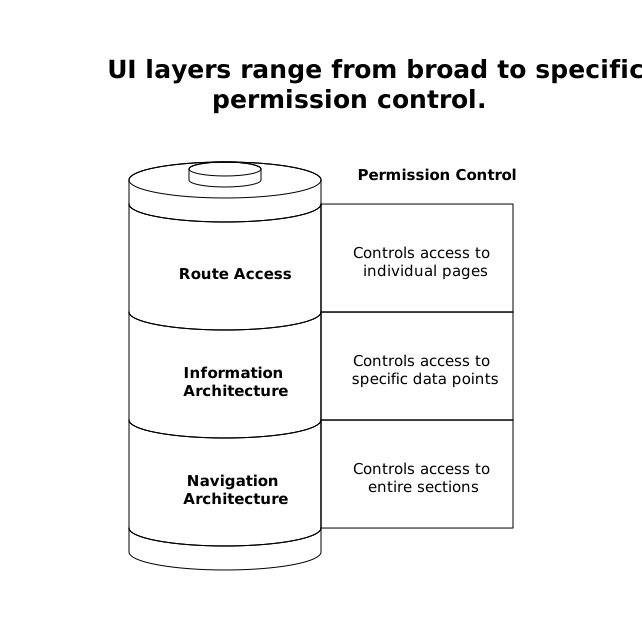
The key is centralizing the logic: one place where route visibility is derived from permissions. When you add a new feature, you update the route registry—not three dashboards.
2) Component-level visibility and editability
Inside a shared page, you typically need to manage:
- Visibility: hide a section entirely (e.g., “Billing settings”).
- Read-only mode: show content but disable inputs.
- Action availability: show buttons conditionally (Create, Delete, Export).
This is where no-code editors shine: you can attach conditional logic to elements. The maintainable approach is to avoid sprinkling ad-hoc checks everywhere. Instead, use helper variables/functions like can('invoice.create') and can('user.invite'), then reference those consistently across the UI.
3) Workflow branching and safe fallbacks
Even if a button is hidden, users can still arrive at a state through other paths (deep links, old bookmarks, shared URLs). Workflows should branch safely:
- If a user can view but not edit, route them to a “details” state, not an edit form.
- If a user lacks a capability mid-flow, stop the workflow and show a next-best action.
- If permissions change (e.g., role downgraded), invalidate cached permissions and refresh.
Designing these “permission edges” is what prevents broken maintainability later.
How to implement this cleanly in a no-code front end
In a platform like weweb.io, the practical pattern is to build a shared foundation and keep permission checks centralized:
- Global state for the current user and their permissions payload.
- Reusable helpers (variables or formulas) that return booleans like “can edit” or “can see billing.”
- Reusable components such as “ProtectedButton” or “ProtectedSection” that encapsulate logic once.
- Route guards that check permission before loading sensitive screens.
The result is a single screen that adapts, rather than a set of cloned screens that inevitably diverge.
Common traps that cause duplication (and how to avoid them)
Trap 1: Roles hard-coded all over the UI
If your UI checks role == 'admin' in 40 places, your next role (“Support”, “Finance”, “Ops”) becomes a refactor. Prefer capability checks or at least abstract role logic into a single mapping layer.
Trap 2: One-off exceptions living in the page
“Only managers can approve, except in Enterprise tier, unless the user is the owner.” These rules belong in:
- The backend authorization policy (source of truth)
- A shared permissions helper in the front end (for UI behavior)
Not as inline conditions scattered across widgets.
Trap 3: Security assumptions based on hidden UI
Hiding an element is not access control. Treat UI conditions as a convenience layer. If you’re building internal tools, portals, or regulated workflows, keep backend checks strict and auditable.
Keep RBAC maintainable as your app grows
RBAC becomes painful when it’s implemented as a set of “screens per role.” It stays manageable when it’s implemented as:
- A backend policy model
- A stable permission payload
- A single set of routes and components
- Centralized, reusable UI checks
That structure makes it easier to ship weekly changes without breaking the app for one role while fixing it for another. If you’re trying to build a fast iteration loop, it pairs well with lightweight planning habits—similar to approaches described in cycle planning without Scrum theater.
And because permission-aware UIs are ultimately about reducing risk, they fit naturally into broader operational workflows where you triage what to build next—like turning feedback into a plan with risk context in a feedback-to-churn build pipeline.
Frequently Asked Questions
How does weweb.io help avoid duplicating screens when implementing RBAC?
In weweb.io you can keep one set of routes and components, then drive visibility, disabled states, and workflow branches from a centralized permission payload stored in global state.
Should I rely on UI conditions in weweb.io for security?
No. In weweb.io, UI conditions should improve usability, but true security must be enforced on the backend (API/database rules) so hidden buttons can’t be bypassed.
What’s better in weweb.io: role checks or capability checks?
Capabilities usually scale better. You can still show roles in the UI for clarity, but using capability flags (e.g., "invoice.export") keeps weweb.io screens flexible as you add roles and exceptions.
How do I handle users who open a restricted link in a weweb.io app?
Use route-level guards in weweb.io to check permissions before loading the page, then redirect to a safe page or show a clear “no access” state with navigation options.
What’s a practical permission payload for a weweb.io front end?
A common approach is returning user ID, workspace/tenant ID, role(s), and a list or map of capabilities from your backend, then caching it in weweb.io global state for consistent UI checks.