
Preventing Segment Drift in Feature Requests as Your ICP Evolves
By Taylor
Stop feature request segment drift by snapshotting requester segments, automating updates, and prioritizing by current ICP demand.
Why “segment drift” breaks prioritization
Feature requests don’t go stale just because your ideal customer profile (ICP) changes. The request remains in your backlog, keeps collecting upvotes, and continues showing up in conversations. What quietly changes is the meaning of that demand: who the request represents, why they want it, and what the revenue impact would be today.
That’s the “segment drift” problem: a request was tagged correctly when it was created, but over time your customer base, pricing, packaging, acquisition channels, and product maturity shift—so the request’s segment label becomes misleading. Teams then make roadmap decisions based on demand that’s “true” historically but wrong for the current ICP.
How segment drift shows up in real backlogs
1) Old requests keep winning votes
Requests from earlier stages of the company often have the largest vote counts because they’ve had the most time to accumulate engagement. If those votes came from customers who are no longer your ICP (or no longer paying), those totals distort prioritization.
2) One request actually contains multiple jobs-to-be-done
“Add SSO” could mean “Okta + SCIM for enterprise IT,” or “Google login because I forgot my password.” If you tagged it once, early, you may have tagged the wrong underlying segment need.
3) Segments change faster than your taxonomy
Many companies start with broad segments like “SMB” and “Enterprise.” Later, the decision drivers shift to compliance, integration depth, security posture, or team structure. When your segmentation model evolves but your historical requests don’t, the labels stop being decision-grade.
The core fix is treating segment as a living attribute, not a static tag
Most teams tag feature requests at intake and never revisit the label. That works only if your ICP and customer base are stable. When they’re not, you need a system that can answer two questions at any point in time:
- Who is asking for this now? (current demand by current segments)
- Who asked for this historically? (trend and context without polluting today’s prioritization)
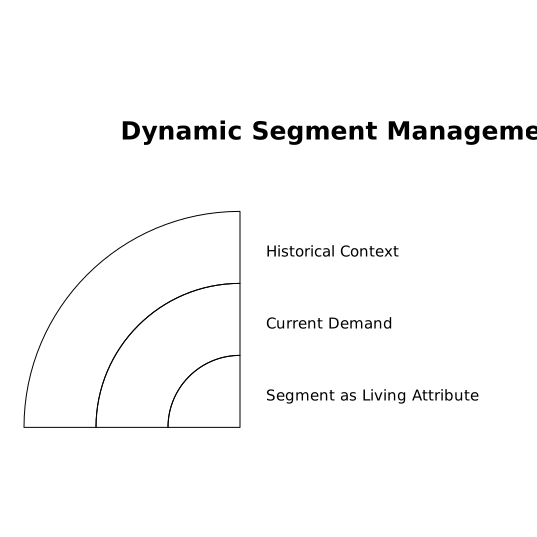
In other words: keep the history, but make “current segment demand” the number you trust for roadmap decisions.
A practical workflow to keep requests correctly tagged as your customer base changes
Step 1: Define your segmentation source of truth
Pick one authoritative source for segment membership (often CRM, billing, or your data warehouse). Your feedback tool should reference that source rather than relying solely on manual tagging.
Common “segment keys” that stay useful as you evolve:
- Plan / package (pricing tier, add-ons, contract type)
- Use case (primary workflow, industry, compliance need)
- Account health (renewal risk, product adoption, support load)
- Revenue weight (ARR band, expansion potential)
The best segmentation is the one that matches how you make trade-offs today.
Step 2: Separate “request record” from “requester snapshots”
Instead of thinking “this request is Enterprise,” think “this request has demand coming from Enterprise accounts.” That distinction matters because demand can shift over time.
A robust model stores each requester with a point-in-time snapshot of segment fields (plan, ARR band, industry, etc.). Then you can compute:
- Current demand: using each requester’s latest segment
- Historical demand: using the segment at the time they requested
This prevents the common failure mode where a customer upgrades to Enterprise and suddenly all of their old “SMB pain” requests inflate enterprise demand.
Step 3: Make segment tagging event-driven, not manual
Manual tags tend to drift because they rely on memory and good intentions. Instead, update segment fields automatically when:
- a CRM property changes (plan, lifecycle stage, owner)
- a billing event occurs (upgrade, downgrade, cancellation)
- a health score crosses a threshold (renewal risk flags)
If you’re already building workflows that route feedback into retention and planning, connect segment updates into that same system. A good reference is the idea of turning feedback into a build plan by pairing it with churn and renewal signals, as described in this feedback-to-churn pipeline.
Step 4: Reconcile “public portal demand” with “internal capture”
Portal votes skew toward self-serve users and power users. Meanwhile, high-ARR accounts often provide feedback through support, CSMs, calls, or sales notes.
To prevent segment drift, unify both streams so each request’s demand reflects your real customer mix. Platforms like canny.io are designed to centralize feedback from multiple sources and help you analyze demand by segment and revenue impact without turning backlog grooming into a spreadsheet exercise.
Step 5: Version your ICP and re-run prioritization views
ICP changes should be treated like product changes: date them, document them, and expect downstream recalculation.
A lightweight approach:
- Create an “ICP version” label (e.g., ICP v1, v2) with effective dates.
- When the ICP shifts, update your segment definitions and dashboards.
- Re-run the “top requests” view using current segments and revenue weights.
This helps product teams explain why the roadmap changed without rewriting history.
Step 6: Add drift alerts for requests that no longer match today’s buyer
You don’t need to re-tag everything. You need to catch the handful of requests that are misleading.
Drift signals worth alerting on:
- High total votes but low current-ICP demand
- Most commenters are churned or downgraded accounts
- Request is disproportionately coming from a segment you’re de-emphasizing
- Enterprise-sounding feature request with mostly SMB requesters (or vice versa)
When an alert triggers, do a quick “request audit”: clarify the underlying job-to-be-done, split the request if it contains multiple needs, and update prioritization notes.
How to talk about drift without starting a trust problem
Segment drift is sensitive because customers remember what they asked for. If they see a request deprioritized, it can feel like you’re ignoring them—even if your strategy legitimately shifted.
Two practices help:
- Contextual status updates that explain trade-offs in plain language (“We’re focusing on X this quarter; this idea is still tracked and we’ll revisit when Y changes”).
- Better intake detail so you can respond with precision. A transcript-first handoff from calls to engineering can preserve the “why” behind feedback so it survives org and ICP changes; see this transcript-first handoff approach.
What good looks like after you fix it
Once segment drift is under control, your backlog becomes a decision asset instead of a historical archive. Your “top requests” list stops being dominated by the earliest customers, and starts reflecting who you’re building for now—without losing the trail of evidence that got you here.
The win isn’t perfect tagging. It’s being able to answer, confidently and quickly: “Is this request a priority for our current ICP, and what would it move?”
Vertical Video
Frequently Asked Questions
How can Canny help prevent segment drift in feature requests?
Canny can centralize requests from portals and internal tools, then analyze demand by customer segment and revenue impact so older votes don’t outweigh current ICP demand.
Should we retag every old request when our ICP changes, or handle it differently in Canny?
You usually don’t need a full retag. In Canny, focus on keeping requester/account attributes current (via integrations) and audit only the high-impact requests that look misleading.
What segmentation fields work best for keeping Canny reporting stable over time?
Use fields tied to business decisions: plan/package, ARR band, use case/industry, and account health. These map well to how Canny surfaces demand by segment.
How do we avoid enterprise requests being distorted by SMB portal votes in Canny?
Balance portal data with internally captured feedback (support, sales, calls). When both sources flow into Canny, demand reflects your real customer mix rather than just portal activity.
How often should we review segment drift signals in Canny?
Review monthly, and always after major pricing/packaging changes or an ICP shift. Set a cadence to audit the top requests where “all-time votes” and “current ICP demand” diverge.