Approval Gates and Partial Handoffs for Customer Service AI Agents
By Taylor
A practical way to add approval gates and partial handoffs so customer-service AI can safely move from drafting to executing.
Why “suggest” isn’t the hard part
Most customer-service AI projects start with an assistant that drafts replies: a helpful “suggest” layer that reduces typing but still relies on humans to send, refund, update, or close. The leap to “execute” is where teams get stuck—not because the model can’t call an API, but because organizations need control. Control means knowing which actions are safe to automate, which require a second set of eyes, and how to hand work to people without losing context.
This article lays out a practical framework for approval gates and partial handoffs—so you can scale automation gradually, ticket by ticket, workflow by workflow. It’s also the approach behind platforms like typewise.app, which are built around orchestration, policies, and human-in-the-loop controls rather than “one bot to rule them all.”
The execution spectrum and why you need gates
Instead of thinking “AI on” vs “AI off,” treat automation as a spectrum:
- Suggest: Draft responses, surface knowledge, propose next steps.
- Assist: Fill forms, pre-populate CRM fields, prepare actions but don’t commit.
- Execute with approval: The agent can perform actions, but a human must approve before the system commits.
- Execute autonomously: The agent completes actions end-to-end within strict policies and auditability.
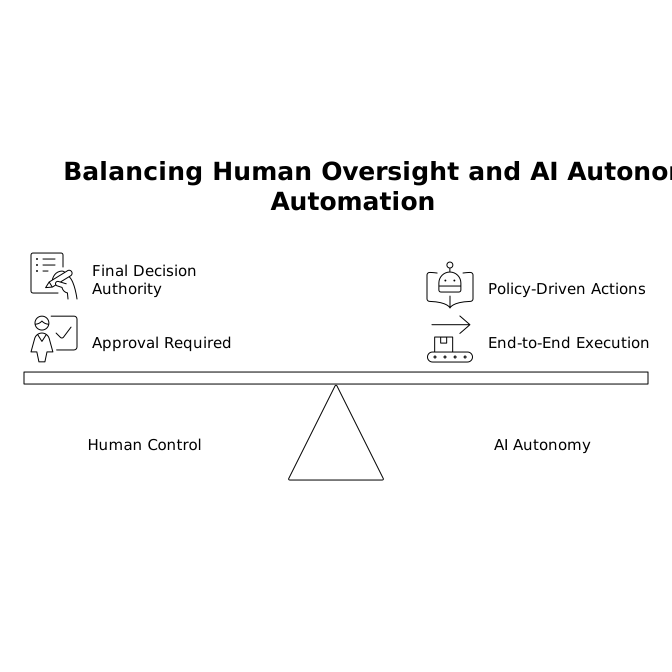
Approval gates are the mechanism that lets you move along that spectrum safely. A gate is simply a rule: “Before the agent can do X, it must meet conditions Y, and optionally request human sign-off.”
A four-layer framework for approval gates
Effective gating is not just a single “approval required” checkbox. In practice, teams need four complementary layers.
1) Intent and action classification
Start by forcing explicitness. Your agent should never “kind of” refund or “sort of” change an address. It should classify:
- Intent: return request, subscription cancellation, invoice dispute, delivery issue, quote update, etc.
- Action type: communicate, update record, issue credit, cancel, re-ship, escalate, or close.
- Object and scope: which order, which subscription, which customer, which line item.
This turns a fuzzy conversation into a structured plan. Multi-agent setups help here: a specialist “returns agent” can propose a return workflow, while a supervisor agent checks completeness and risk before anything happens.
2) Policy gates based on risk and business rules
Next, define policy rules that trigger approvals. Keep them practical and easy to explain to stakeholders. Common examples:
- Financial thresholds: refunds above $50 require approval; credits above $200 require manager approval.
- Identity confidence: if authentication is weak or mismatched, block account changes.
- Regulated content: anything touching medical, legal, or sensitive personal data requires review.
- Contract constraints: renewals, discounts, or terms changes always need sign-off.
The goal is not to eliminate human judgment; it’s to route judgment to the right moments. You’ll often find that 70–90% of tickets can execute safely once these guardrails are explicit.
3) Evidence gates and “show your work” requirements
Approvals are only fast if reviewers can trust what they’re approving. Add evidence gates that require the agent to attach:
- Source citations: the policy article, KB entry, or order record used.
- A computed rationale: how the refund amount was calculated, which SKU is eligible, which window applies.
- A reversible plan: the exact actions proposed, in order, including what will be written to each system.
This is where a Knowledge & Actions Hub approach matters: grounding decisions in company sources and controlling execution paths. It also makes audits much easier—especially when customers dispute outcomes.
4) Confidence and anomaly gates
Even if a request is “normally safe,” you still want the agent to slow down when something looks unusual. Examples:
- Outliers: refund requested is far above typical for the product.
- Velocity: multiple similar claims from the same customer in a short window.
- Data mismatch: shipping address differs across systems, or the order status is inconsistent.
- Low model certainty: unclear intent or contradictory user statements.
These gates reduce “silent failures,” where an agent confidently does the wrong thing because the ticket looked routine.
Partial handoffs that don’t break the workflow
Classic escalations are blunt: the bot gives up and the human starts over. Partial handoffs are different: the agent completes the parts it’s good at, then hands a compact decision to a human.
A practical handoff package includes:
- One-line summary: what the customer wants and why now.
- Structured facts: order ID, product, dates, eligibility, customer tier, prior history.
- Recommended action: refund/replace/deny with policy reference.
- Approval buttons: approve, modify amount, request more info, or escalate.
This structure also prevents “approval theater,” where humans click approve without understanding impact. If you’ve built internal workflows for capturing decisions and follow-ups, the same discipline applies here; a lightweight, consistent capture is better than yet another meeting or long thread. (Related: closing the meeting memory gap with a 5-minute workflow.)
Designing approval gates around the real failure modes
Approval gates should map to how AI systems fail in customer service:
- Wrong policy application: the agent uses the wrong eligibility window or misreads an exception.
- Wrong object: applies an action to the wrong subscription, order, or customer record.
- Incomplete execution: refunds the charge but doesn’t update the ticket or notify shipping.
- Tone/compliance drift: wording violates brand or regulatory constraints.
To mitigate these, treat “execute” as a controlled transaction with pre-checks and post-checks. Pre-checks validate data and policy. Post-checks verify outcomes and log them. Platforms like Typewise emphasize built-in evaluations, simulations, and policy enforcement so workflow changes can be validated before going live, rather than discovered via unhappy customers.
A rollout plan that avoids the big-bang trap
You don’t need a single go-live moment. A safer pattern is progressive delegation:
- Start with one workflow: e.g., returns for a single region or product line.
- Enable execute-with-approval: humans approve actions, and you measure cycle time and error rates.
- Promote specific intents to autonomous: only the subset that shows stable outcomes.
- Expand integrations: add the next system when the first is boring and reliable.
Make sure your system logs every proposed and executed step with an audit trail. If your actions live across CRM, commerce, billing, and ITSM, deep integrations and role-based controls matter. That’s one reason orchestration layers designed for customer service—rather than generic agents—tend to scale more predictably.
What to measure so gates don’t become bottlenecks
Approval gates are only “practical” if they keep throughput high. Track:
- Approval rate: percent approved without edits.
- Edit distance: how often humans adjust amounts, wording, or steps.
- Time-to-approve: where reviews stall (queue design matters).
- Rollback rate: actions reversed after execution.
- Customer outcomes: repeat contacts, CSAT, and resolution time.
When a gate creates too much friction, don’t remove it blindly. Instead, improve the evidence package, tighten policy rules, or narrow autonomous scope. If you have reliable intent trend reporting, you can also prioritize which workflows to automate next based on volume and risk.
How Typewise fits into this approach
Typewise is designed around exactly these realities: customer service isn’t one model replying in a chat box; it’s a set of orchestrated workflows that read and write across systems under policy control. With a supervisor plus specialist agents, hybrid approvals, and strong governance (including enterprise security and compliance posture), teams can implement “execute” gradually—starting with approvals and partial handoffs, then promoting stable paths to full automation.
The practical takeaway is simple: don’t ask whether an agent can execute. Ask under which gates it should execute, what evidence it must provide, and how humans can intervene without restarting the ticket.
Vertical Video
Frequently Asked Questions
How do approval gates in Typewise differ from a simple “human review” step?
In Typewise, gates can be tied to intent, action type, policy thresholds, and evidence requirements—so approvals trigger only when risk warrants it, not for every ticket.
What’s the best first workflow to automate with Typewise using execute-with-approval?
Pick a high-volume, well-documented process like basic returns or address changes, then use Typewise approvals to validate the action plan before committing changes in your systems.
How do partial handoffs reduce escalations when using Typewise?
Typewise can hand a reviewer a structured packet—summary, key facts, policy references, and a proposed action—so the human decides quickly without re-reading the entire conversation.
What should be included in an “evidence package” for approvals in Typewise?
Typically: the policy or KB source used, the exact records referenced (order/subscription), the computed amounts or eligibility logic, and a step-by-step action plan for what will be executed.
Can Typewise support approvals across multiple channels like email and WhatsApp?
Yes. Typewise is omnichannel and maintains context as customers move between channels, which helps approvals and handoffs stay consistent regardless of where the conversation started.