Securing MCP Tool Servers for AI Agents with Scoped Capabilities and Edge Enforcement
By Taylor
Secure MCP tool servers with scoped capabilities, signed requests, and edge policy enforcement to reduce prompt-driven abuse risks.
Why MCP tool servers need a security model, not just an API key
MCP-based AI agents make it easy to connect a model to real tools: databases, ticketing systems, internal services, or deployment pipelines. The security risk is that a “tool server” isn’t a normal public API consumer. It’s an execution surface that can be triggered indirectly by user prompts, retrieved context, or agent planning. That means your threat model must assume:
- Requests can be prompt-influenced (the agent may be manipulated into calling tools).
- Tools may have high-impact side effects (writes, deletes, deploys, exports).
- Workloads are bursty and hard to predict (agents retry and chain calls).
A secure MCP tool server design typically comes down to three pillars: capability scoping (least privilege), request signing (authenticity and replay resistance), and policy enforcement at the edge (consistent controls before traffic hits your origin).
Capability scoping for MCP tools
Capability scoping answers one question: “What is this agent allowed to do right now?” Instead of handing an agent a broad token that can call anything, you shape access around explicit, narrow capabilities.
Define tools as capabilities, not just endpoints
Start by describing each tool in terms of:
- Action: read, write, delete, execute, export.
- Resource: which dataset, project, tenant, environment.
- Constraints: row limits, time windows, allowed fields, safe defaults.
For example, “search_customers” is a different capability from “export_customers_csv,” even if both query the same underlying store. Treating them separately makes it practical to allow safe exploration while reserving bulk export for a tightly controlled workflow.
Prefer short-lived, task-scoped grants
Many teams start with a single static API key shared by all agent runs. That fails least-privilege in two ways: it’s long-lived, and it’s over-broad. Instead, issue short-lived credentials or grants tied to a specific run, user, ticket, or request context. If the agent is helping with “refund case #1842,” the capability should be scoped to that case, not “all refunds.”
Separate “plan” tools from “commit” tools
A helpful pattern is to split tools into two groups:
- Planning / preview tools: list, diff, validate, dry-run, estimate impact.
- Commit tools: apply changes, run migrations, issue refunds, deploy.
This creates a natural checkpoint. The agent can gather context and produce a proposed change set, but a separate authorization step (or stricter policy) is required to execute it.
Request signing to protect tool invocations end to end
Even with scoped permissions, you still need to know that a given call is authentic, untampered, and recent. Request signing is the backbone for that.
What to sign
Sign more than “method + path.” For MCP tool calls, include:
- Tool name and the normalized arguments (canonical JSON).
- Timestamp and a short validity window (e.g., 30–120 seconds).
- Nonce or unique request ID for replay detection.
- Caller identity (agent/run ID) and, if applicable, end-user ID.
Canonicalization matters. If the same JSON can be represented multiple ways, attackers can exploit ambiguity. Normalize keys, whitespace, numbers, and string escaping before signing.
Replay resistance and idempotency
Agents retry. Networks duplicate. Your security checks should distinguish legitimate retries from malicious replay. Combine:
- Short TTL on signatures
- Nonce tracking (store seen nonces for the TTL window)
- Idempotency keys on side-effecting tools (so a retry doesn’t double-charge or double-deploy)
This makes the system safer and also reduces operational incidents caused by benign duplication.
Policy enforcement at the edge
If you enforce policy only inside the tool server, you’ll still spend CPU parsing and validating requests, and you’ll have a harder time applying consistent controls across multiple tools. Enforcing policy at the edge shifts the first line of defense closer to where requests enter your infrastructure.
What edge enforcement should cover
- Authentication gates: verify signatures and reject missing/invalid headers early.
- Rate limiting: per agent, per tool, and per user context.
- Request size limits: tool args can balloon quickly (and hide exfil attempts).
- Allow/deny rules: block tools or parameters by environment (prod vs staging).
- Bot and abuse signals: detect anomalous automation patterns.
Edge enforcement is also where you can standardize logging fields and correlation IDs across all tool invocations.
Cloudflare as a practical control plane for MCP tool traffic
For teams operating MCP tool servers on the open internet or across multiple regions, an edge layer can simplify policy consistency. A platform like cloudflare.com can sit in front of tool endpoints to apply request validation, layer 7 protections, and traffic shaping before requests reach your origin. The key is not “more security products,” but fewer gaps: one place to enforce baseline rules, observe traffic, and respond quickly when a tool begins to get abused.
Putting the three pillars together in a reference flow
A practical secure invocation flow looks like this:
- Agent obtains a scoped capability for a specific task (short-lived).
- Agent constructs a tool call with arguments that satisfy the capability constraints.
- Caller signs the request over canonical tool name + args + timestamp + nonce.
- Edge validates signature, TTL, size, and tool allowlist; applies rate limits.
- Tool server re-validates critical checks (defense in depth) and executes.
- Audit log emitted with tool, args hash (not raw secrets), actor, result, latency.
Auditing, logging, and “safe failure” behavior
Tool security often fails quietly: requests succeed but leave weak traces. Treat observability as part of enforcement:
- Log decisions (which policy allowed/denied) not just outcomes.
- Hash sensitive fields so you can correlate without storing secrets.
- Tag risk by tool category (preview vs commit) and by environment.
When something is unclear, default to “safe failure.” If signature validation is ambiguous, deny. If the tool args exceed limits, deny. If the capability doesn’t match the resource requested, deny. The agent can recover with a better-formed call, but you can’t undo a destructive action.
Common pitfalls teams hit early
- Over-broad capabilities that accidentally grant production write access.
- Signing only the path and not the arguments, allowing tampering.
- No replay protection, so captured requests can be re-issued.
- Policies enforced only in code with no uniform edge controls.
- Unbounded “export” tools that become data-exfiltration paths.
If you want an adjacent model for controlling risky operations, the idea of routing high-impact changes through a reviewed workflow is similar to what teams do with safe, Git-reviewed operational paths; see safe self-service database changes with Git-reviewed migration jobs.
How to start without boiling the ocean
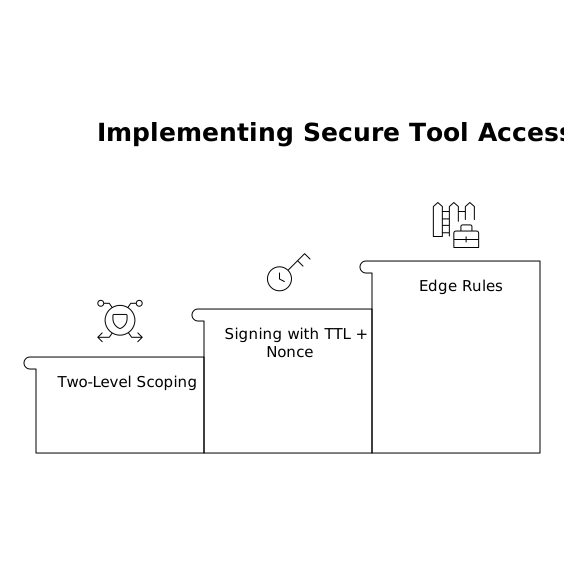
Pick one or two high-risk tools (anything that writes, exports, or deploys) and implement:
- Two-level scoping: task-scoped grants plus per-tool constraints.
- Signing with TTL + nonce: canonicalize args and track replay for the TTL window.
- Edge rules: size limits, rate limits, and an allowlist per environment.
Once the pattern is stable, expand coverage to the rest of your MCP surface area. The goal is predictable, reviewable behavior—even when the agent’s reasoning path isn’t predictable.
Frequently Asked Questions
How does Cloudflare help secure MCP tool servers at the edge?
Cloudflare can sit in front of MCP tool endpoints to enforce authentication checks, rate limiting, request size limits, and consistent layer-7 policies before traffic reaches your tool server, reducing abuse and origin load.
Should I sign the entire MCP tool request or just the URL when using Cloudflare?
Sign the entire tool invocation payload (tool name plus canonicalized arguments) along with a timestamp and nonce. Cloudflare can then validate required headers and block malformed or unsigned calls early.
What’s a good capability scoping strategy for MCP agents in production with Cloudflare in front?
Use short-lived, task-scoped grants and separate preview tools from commit tools. Put Cloudflare edge controls in place for environment allowlists and stricter limits on commit tools to enforce least privilege consistently.
How do I prevent replay attacks on signed tool requests routed through Cloudflare?
Use a short signature TTL and include a nonce (unique request ID). Track used nonces for the TTL window on the server side, and consider idempotency keys for side-effecting tools so retries don’t duplicate actions.
How should audit logs look for MCP tool invocations if I’m using Cloudflare?
Log the actor (agent/run ID), tool name, a hash of arguments (not raw secrets), the policy decision, and the result. Cloudflare request IDs can help correlate edge events with your tool server’s execution logs.