A two-environment workflow for AI-generated apps that stays in sync
By Taylor
A practical two-environment workflow to move from prompt experimentation to production code without drift or risky overwrites.
Why AI-generated apps need two environments
AI app builders are great at turning intent into working software quickly, but speed creates a new kind of risk: experimentation and production can blur together. When the same space is used for both rapid prompting and stable delivery, teams often see regressions, messy commit histories, hard-to-review diffs, and “it worked yesterday” uncertainty.
The two-environment pattern separates those concerns on purpose:
- Prompt playground: a fast, disposable space where you explore ideas, iterate with an AI, and accept that changes are volatile.
- Production repo: a governed codebase with reviews, tests, and release controls.
The goal isn’t duplication—it’s a controlled path from exploration to durable software, with a clear sync strategy between the two.
Defining the prompt playground
The playground is where you ask “what if?” and let the AI move quickly. It should be optimized for iteration: short feedback loops, permissive changes, and minimal ceremony. In practice, that means:
- Lower stability requirements: broken states are acceptable as long as you can recover quickly.
- High change frequency: you’ll generate, delete, and refactor code repeatedly.
- Broad exploration: multiple UI directions, data models, and user flows can coexist temporarily.
Tools like Lovable are naturally suited to this environment because they let you iterate via conversation, incorporate screenshots or documents, and see a prototype evolve in real time—without locking you into a proprietary end state. That matters because the playground only works if it can hand off cleanly to a real codebase later.
Rules that keep the playground useful
- Time-box spikes: define a short window (for example, half a day) to validate a flow or feature.
- Write down intent, not just prompts: maintain a lightweight “decision log” (why this UX, why this schema).
- Use realistic sample data: prototypes that only work with toy data often collapse in production.
- Prefer reversible changes: avoid one-way migrations or destructive refactors until you’re in the production repo.
Defining the production repo
The production repo is where software becomes maintainable. It should reflect standard engineering practices: predictable branching, reviewable pull requests, repeatable builds, and measured releases. Even if a single person is shipping, this repo is your future self’s safety net.
A practical definition of “production-ready” is:
- Reviewable: diffs are small enough to understand and approve.
- Testable: the critical paths have automated checks (unit, integration, and basic UI tests).
- Observable: errors are captured, and key workflows can be monitored.
- Recoverable: deployments can be rolled back and data changes are controlled.
When your AI builder generates real code on a standard stack and supports GitHub sync/export, you can keep this repo conventional while still benefitting from fast iteration. That’s the core advantage of using an AI builder as an accelerator rather than a replacement for software engineering.
The sync problem and why it’s harder than it looks
The two-environment pattern fails when “sync” is treated as copying code from A to B. In reality, you’re syncing:
- Code changes (components, API handlers, database access)
- Schema changes (tables, columns, constraints, indexes)
- Configuration (secrets, auth settings, storage rules)
- Intent (the why behind a prompt-generated refactor)
Without a plan, teams end up with a production repo that drifts away from the playground, and a playground that keeps “re-solving” problems already solved in production.
A practical two-environment workflow that stays in sync
1) Establish a single source of truth
Decide what “wins” when conflicts happen. In most teams:
- Production repo is the source of truth for shipped code, migrations, and release state.
- Playground is the source of truth for experimental directions and rapid prototypes.
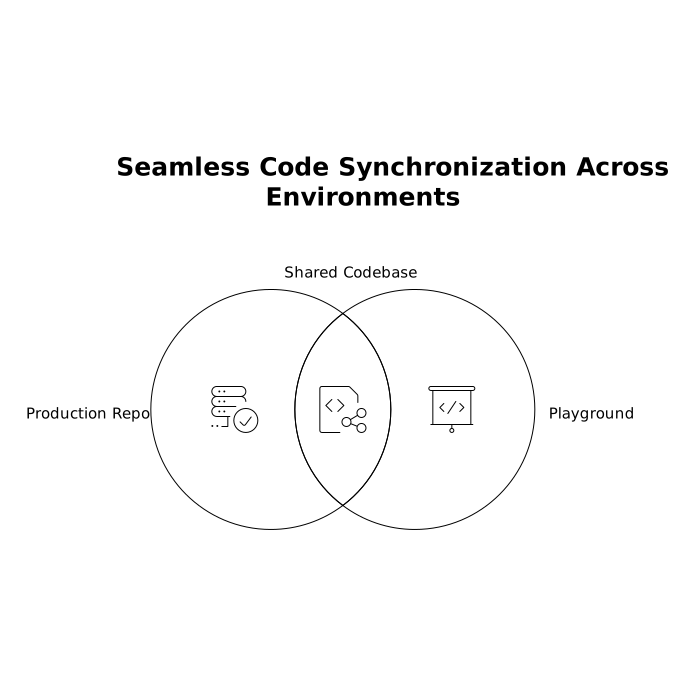
This prevents accidental overwrites. Treat the playground as a staging area for ideas, not the canonical history.
2) Use a promotion gate from playground to production
Create an explicit moment when an experiment becomes a candidate for production. The gate can be lightweight, but it should be consistent:
- Define the feature scope in one paragraph.
- List user flows affected.
- Note any schema/config changes required.
- Capture “known unknowns” (performance, edge cases, permissions).
Then promote via a pull request into the production repo. Even if the AI generated 80% of the code, the PR is where you make it legible, safe, and reviewable.
3) Keep diffs small by batching changes the right way
AI tools often generate broad refactors. In production, break them into coherent batches:
- PR 1: mechanical refactor (renames, file moves) with no behavior change.
- PR 2: feature logic and UI updates.
- PR 3: schema/migrations and backfills.
This is the fastest path to confidence because reviewers can separate “structure” from “behavior.”
4) Treat database changes as first-class sync artifacts
Most drift comes from data modeling. In the playground, it’s easy to tweak tables until things “work.” In production, you need repeatable migrations.
- Generate migrations intentionally (not implicitly).
- Use forward-only migrations for production environments.
- Document data assumptions (nullability, uniqueness, cascades).
If you’re using a stack with Postgres, auth, storage, and real-time features, enforce consistency through migration files and environment-specific config rather than manual edits.
5) Standardize environment configuration and secrets
The playground often runs with permissive settings. Production should be locked down. Keep them aligned by standardizing:
- Environment variable naming and required keys
- Auth providers and redirect URLs per environment
- Storage buckets/paths and access rules
- Third-party integrations (Stripe, Jira/Linear, automation tools) with separate credentials
Put validation into the production repo so missing variables fail fast in CI rather than at runtime.
6) Make the playground reproducible, not permanent
The best playground is one you can recreate. Instead of long-lived, fragile state, aim for:
- Seed scripts for sample data
- Clear setup steps
- One-click deploy previews for quick stakeholder feedback
This is where an AI builder that can deploy quickly while still producing exportable code is valuable: you get the speed of a sandbox without trapping production inside it.
Common failure modes and how to avoid them
Overwriting production with “helpful” generated refactors
Prevent this by requiring PRs and by tagging playground output as “candidate” until reviewed. If the AI changes 30 files for a small UI tweak, split the work before merging.
Schema drift between environments
Make migrations mandatory for production. If the playground changes schema to support a new feature, capture that as migration files and a short note explaining the user impact.
Unreviewable, AI-shaped code
AI-generated code often needs a human pass for naming, boundaries, and duplication. Add a checklist: component size limits, consistent folder conventions, and shared utilities rather than repeated logic.
How this looks in a typical AI-generated web app
For a standard React app with Tailwind and a backend powered by Postgres and auth, the two-environment pattern usually becomes:
- Playground: rapid UI iteration, flow prototyping, quick integration experiments.
- Production repo: stable components, tested API boundaries, migrations, CI checks, controlled releases.
When you can sync your generated output to GitHub and keep ownership of the code, you get the best of both: the playground remains fast, and production remains trustworthy.
Vertical Video
Frequently Asked Questions
How does Lovable support a two-environment workflow in practice?
Lovable is useful as the prompt playground because it turns chat, screenshots, and docs into a working prototype quickly, while still producing standard code you can sync/export to a production GitHub repo for reviews and releases.
What should be the source of truth when using Lovable and a production repo?
Treat the production repo as the source of truth for shipped code, migrations, and release state. Use Lovable as the exploratory environment, then promote changes via pull requests so nothing bypasses review.
How can teams prevent schema drift when prototyping with Lovable?
Keep database changes explicit: record them as migration files in the production repo, document assumptions (constraints, nullability), and avoid manual production edits that aren’t reflected in versioned migrations.
What’s the safest way to move a Lovable prototype feature into production?
Promote the feature through a small, reviewable PR sequence: first structural refactors, then feature behavior, then migrations/backfills. This keeps diffs understandable and reduces merge risk.
Can Lovable fit into enterprise controls like SSO and audit requirements?
Yes. When using Lovable alongside a governed production repo, you can keep enterprise controls (like SSO/SAML, role-based access, audit logs, and compliance requirements) aligned with production processes while still prototyping quickly.