AI Builder Handoff Playbook for React Apps and Supabase Backlogs
By Taylor
A practical handoff playbook to turn AI-built React apps into secure, maintainable backlogs with Supabase RLS and PR checklists.
What an “AI builder handoff” really is
An AI builder handoff is the moment chat-generated product code becomes a team-owned software project. The goal isn’t to “clean up AI code” in the abstract. It’s to convert a working prototype into a maintainable backlog with clear ownership, repeatable review steps, and security rules that won’t break the moment you add roles, billing, or multi-tenant data.
Tools like Lovable make this transition easier because the output is real, standard code (React, Supabase, Tailwind) with GitHub sync and export. That means the handoff can follow familiar engineering habits: tickets, pull requests, checks, and staged environments—rather than a one-off “prototype rescue.”
Step 1: Freeze the prototype into a baseline branch
Before you start refactors, create a baseline that you can always compare against.
- Create a “handoff” branch from the current working state (e.g.,
handoff/2026-03-23). - Tag a release if it’s already deployed, so bug reports map to a snapshot.
- Capture environment details: Supabase project ref, auth providers enabled, storage buckets, edge functions (if any), and any external integrations.
This baseline prevents endless debate about whether a change is “improving” the app or accidentally changing behavior.
Step 2: Convert chat output into an engineering backlog
AI-generated React code often arrives as features rather than tasks. Convert features into backlog items with acceptance criteria and test hints.
Backlog buckets that work in practice
- Architecture & code health: routing consistency, component boundaries, state management approach, error handling.
- Data & security: Supabase RLS, policies per table, role model, tenant isolation.
- Auth & onboarding: login methods, email verification, password reset, session refresh, edge cases.
- UI behavior: loading states, empty states, optimistic updates, accessibility.
- Operational readiness: logging, monitoring, migrations, seed data, staging parity.
For each ticket, write: the user story, the “done” definition, and the risk (security, data loss, UX regression). That’s the bridge between a chat transcript and a sprint plan.
Step 3: Establish folder conventions and component boundaries
Maintainability problems usually come from unclear boundaries: data fetching inside UI components, duplicated Supabase queries, and ad-hoc auth guards. Standardize early.
/featuresor/modulesby domain (billing, projects, settings)./componentsfor reusable UI primitives (buttons, modals)./libfor shared utilities: Supabase client, formatting, validation./routesor framework-native routing with a consistent pattern for protected pages.
As you move files, keep behavior stable by adding lightweight tests (even just smoke tests) before reorganizing large sections.
Step 4: Make Supabase RLS the source of truth
If the app is headed toward production, treat Row Level Security (RLS) as mandatory—not optional. Client-side filtering is not a security boundary.
RLS checklist by table
- Enable RLS on every user-facing table.
- Define ownership: which column maps to the authenticated user (
user_id) or tenant (org_id). - Write policies for CRUD (separate policies are often clearer than one policy that tries to do everything).
- Use least privilege: default deny, then allow only what you need.
A practical pattern for multi-tenant apps
Most handoffs fail when “organizations” are added later. Even if you only have personal accounts today, plan for an orgs table and a join table like org_members. Then RLS can consistently enforce org_id access rather than inventing one-off rules per feature.
Also decide early whether you’ll use database roles, custom claims, or a membership table for authorization. For many teams, membership tables plus RLS policies are the most transparent to audit in PR reviews.
Step 5: Standardize auth flows and edge cases
Auth is where prototypes often feel “done” while production apps break: expired sessions, half-finished onboarding, and missing redirects.
Auth flows to formalize
- Sign up: confirm whether you require email verification before access.
- Sign in: handle provider vs. password flows consistently.
- Password reset: ensure redirect URLs are correct across environments.
- Session refresh: confirm the client handles token refresh without UI loops.
- Sign out: clear cached data and reset app state.
Create a single “auth boundary” in the UI: a route guard (or layout) that is responsible for redirecting unauthenticated users, showing a loading state while sessions initialize, and preventing protected queries from firing too early.
Step 6: Create a PR checklist that prevents regressions
AI-generated code can be perfectly fine, but teams need a repeatable review standard. Add a pull request template and treat it as part of the handoff.
PR checklist for this stack
- RLS impact: any new table/column includes updated policies; no “temporary” public access.
- Auth impact: route protection updated; redirects tested for sign-in/out and reset flows.
- Data access: Supabase queries centralized (no duplicate query logic scattered across components).
- UI states: loading/empty/error states implemented for new screens.
- Migrations: schema changes are migration-driven; seed data updated if needed.
- Tests: at least one targeted test or a documented manual test plan.
- Observability: meaningful error logging for new failure paths.
The key is not the length of the checklist—it’s that reviewers can quickly answer, “Does this change introduce a new way to bypass permissions?”
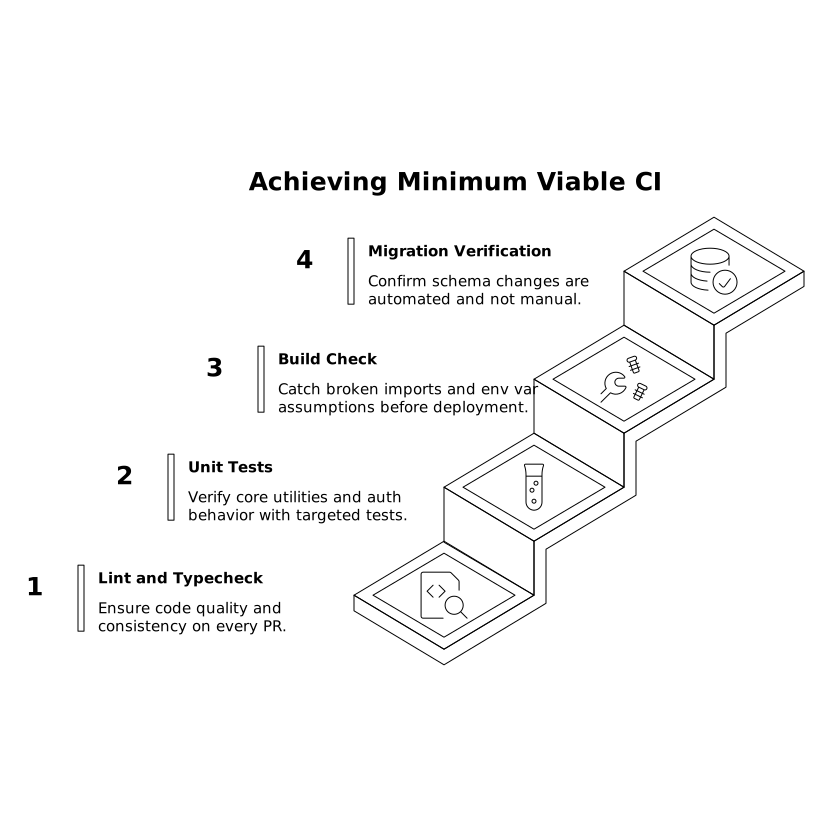
Step 7: Automate the minimum viable CI for React and Supabase
You don’t need an enterprise pipeline on day one, but you do need guardrails.
- Lint and typecheck on every PR.
- Unit tests for core utilities and auth boundary behavior.
- Build check to catch broken imports and env var assumptions.
- Migration verification to ensure schema changes aren’t “manual in the dashboard.”
Because Lovable outputs code your team owns, it fits neatly into standard GitHub workflows: PRs, checks, and incremental refactors rather than rewrites.
Step 8: Define “done” for handoff
A handoff is complete when the project is no longer dependent on the original chat context. Concretely, aim for:
- A prioritized backlog with security and auth work explicitly tracked.
- RLS enabled and reviewed for all user-facing data.
- A documented auth flow with tested redirects and edge cases.
- A PR template and CI checks that catch common regressions.
- A baseline release tag so future changes are measurable.
That’s the difference between “we have an AI prototype” and “we have a software product the team can safely evolve.”
Vertical Video
Frequently Asked Questions
How does Lovable help with an AI builder handoff compared to copy-pasting code?
Lovable produces standard React and Supabase code you own and can sync to GitHub, so handoff work becomes normal PRs, reviews, and CI—not a one-off prototype migration.
What’s the first security task engineers should do after exporting a Lovable app to GitHub?
Review Supabase Row Level Security: enable RLS on user-facing tables, then add explicit policies for read/write paths based on user_id or org_id before expanding features.
How can a team avoid auth regressions when iterating on a Lovable-built React app?
Create a single auth boundary (route guard/layout) and a checklist covering sign-up, sign-in, password reset redirects, session refresh, and sign-out state reset, then enforce it in PR reviews.
Do we need multi-tenant design from day one if we started in Lovable with personal accounts?
You don’t need full org features immediately, but it’s wise to model org_id early (orgs and org_members tables) so Lovable’s Supabase-backed app can evolve without rewriting RLS later.
What should be in a PR checklist for Lovable apps using Supabase?
Include RLS and policy updates, auth flow impacts, centralized query changes, migrations, UI loading/error states, and at least a targeted test or documented manual test plan for each PR.