Dependency Drag Score for Cross-Team Blockers in Linear
By Taylor
A lightweight Dependency Drag Score to flag cross-team blockers early, reduce waiting time, and keep releases on track.
The Dependency Drag Score for spotting cross-team blockers early
Most releases don’t slip because the work is hard. They slip because the work is waiting—on another team’s review, a platform change, a security sign-off, a data backfill, a vendor response, or a “quick” decision that never lands. The painful part is that these blockers often look harmless in planning: the ticket is small, the estimate is reasonable, and the team is “almost done.”
The Dependency Drag Score is a lightweight way to make that waiting visible before it stalls a release. It doesn’t require new ceremonies, complex tooling, or perfect estimates. It’s simply a consistent score you attach to work that depends on someone else—and a few habits for acting on the score.
What “dependency drag” actually measures
“Dependency” is easy to define: your team can’t ship without another team doing something. “Drag” is the part we usually fail to quantify: the hidden time cost introduced by handoffs, queueing, context switching, and misaligned priorities.
A Dependency Drag Score should capture three realities:
- Likelihood of waiting (will you actually get blocked?)
- Impact if waiting happens (does it threaten the release date or scope?)
- Time to recover (once it’s late, can you reroute or parallelize?)
You’re not trying to predict the future precisely. You’re trying to rank risk so you can pull the right conversations forward.
A simple scoring model you can use tomorrow
Keep it intentionally small. The most useful system is the one teams will keep using.
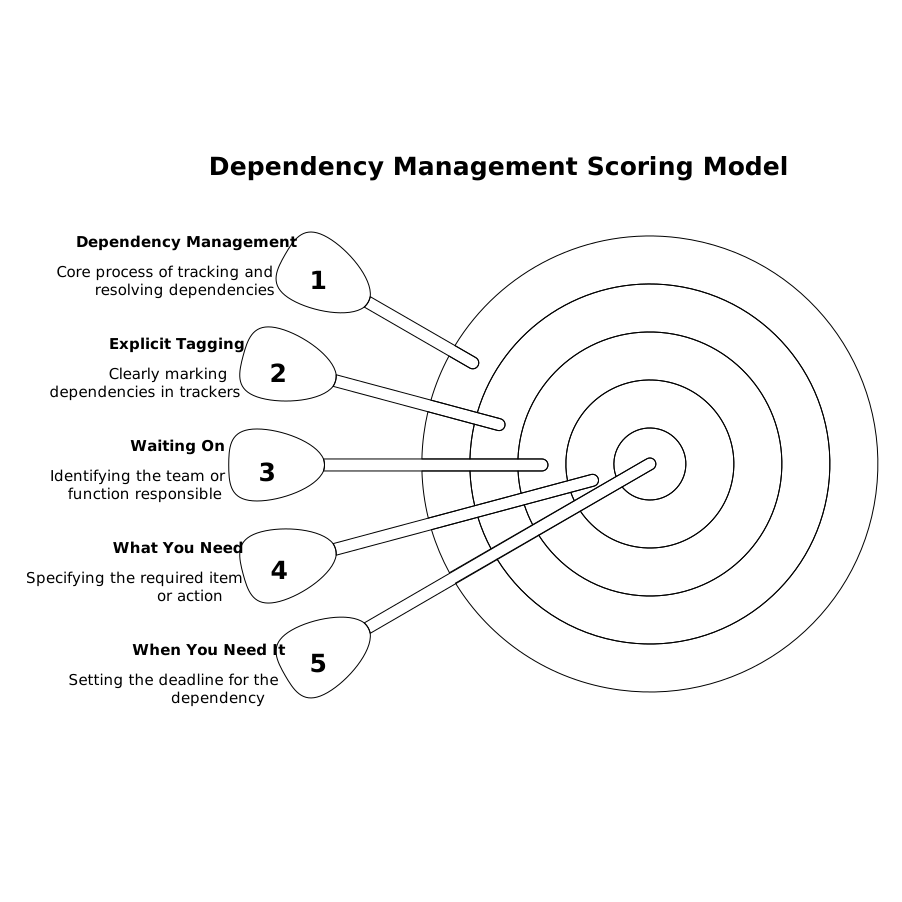
Step 1: Tag dependencies explicitly
For any piece of work that requires another team, add a dependency marker in your tracker:
- Who you’re waiting on (team or function)
- What you need (decision, review, implementation, access, data)
- When you need it (date, or “before code complete” / “before QA”)
If you’re using linear.app, this is straightforward to represent via issue relationships (blocking/blocked), labels, and a short dependency note in the description so it’s visible in list views and triage.
Step 2: Score three inputs from 0–3
Use a 0–3 scale for each input. It’s coarse on purpose.
- Externality (E): How outside your control is the dependency?
- 0 = same squad, same sprint/cycle
- 1 = same org, known owner, quick turnaround
- 2 = different team with competing priorities
- 3 = outside org (legal/vendor) or unclear ownership
- Coupling (C): How tightly does the dependency sit on the critical path?
- 0 = nice-to-have; can ship without it
- 1 = can ship with a workaround/flag
- 2 = required for release quality or compliance
- 3 = hard gate; no ship without it
- Rework Risk (R): How likely is it that what you get back forces changes?
- 0 = well-defined, stable interface
- 1 = minor unknowns
- 2 = evolving requirements or interface
- 3 = ambiguous scope, likely redesign
Step 3: Calculate the Dependency Drag Score
Use a simple sum: Drag = E + C + R (0–9).
- 0–2 (Green): Track it, but don’t reorganize the plan around it.
- 3–5 (Yellow): Pull the conversation earlier; add a visible “waiting-on” state.
- 6–9 (Red): Treat as release risk; escalate ownership and create a fallback path.
This gives you a consistent language across teams without pretending you can estimate every delay in days.
How to operationalize the score without adding process
Make “waiting” a first-class status
Teams often hide waiting inside “In Progress,” which makes cycle dashboards look healthy while time quietly disappears. Instead, explicitly move work into a “Waiting on X” state (or apply a label) the moment you cannot proceed. The goal isn’t to shame; it’s to surface drag early enough to react.
If you like the idea of turning waiting into something schedulable rather than vague, the pattern of treating time blocks as a queue translates well here; see use your calendar as a queue to auto-schedule follow-ups and waiting-on work for a practical approach to making follow-ups predictable.
Run a five-minute dependency scan during planning
Before you commit a cycle/release scope, scan for Red and Yellow items and ask only these questions:
- Who is the named owner on the other side?
- What is the exact deliverable (PR, config, decision, data)?
- When is the latest safe date to receive it?
- What is the fallback if it misses?
This isn’t a meeting; it’s a checklist that prevents “we assumed they’d handle it” from becoming a surprise.
Use “dependency buffers” instead of padding estimates
Padding individual tasks makes plans look slower and still doesn’t guarantee you’ll protect the critical path. A better approach is to allocate a small release buffer specifically for dependency drag. Red items consume buffer first; Green items don’t get buffer at all.
When the buffer gets eaten early, you have an objective trigger to reduce scope or move a dependent feature behind a flag.
Turn red dependencies into parallel tracks
High drag usually means you need parallelization, not optimism. Common tactics:
- Pre-wire interfaces: stub contracts, feature flags, mock data.
- Decouple deliverables: ship UI behind a flag while backend catches up (or vice versa).
- Split approvals: security review of the approach first, implementation later.
- Define “good enough”: a minimal version that doesn’t require the dependency.
In Linear, this maps cleanly to breaking a large issue into smaller ones, with explicit blocking links so the critical path is visible rather than implied.
Common failure modes and how the score prevents them
“We didn’t know it was a dependency”
If a team only realizes a dependency after implementation starts, you’ll see a sudden stall that wasn’t planned for. The scoring step forces the dependency to be named early—especially Coupling, which quickly reveals what’s actually a gate.
“It was small, so we assumed it would be fast”
Small tasks can have high externality. A one-line config change can take two weeks if ownership is unclear or the other team is in a freeze. Externality captures that reality without requiring you to guess calendar days.
“We got the dependency, but it changed everything”
Rework risk is the silent killer. If requirements or interfaces are unstable, you’ll pay drag twice: waiting and rework. Scoring rework risk pushes teams to lock down a decision record, confirm contracts, or ship a narrower version first.
Where this fits with execution-first cycle planning
The Dependency Drag Score pairs well with lightweight cycle planning because it doesn’t require story points or heavy ceremonies. You can keep weekly shipping habits while still acknowledging cross-team reality. If your team is already trying to avoid sprint theater, the approach in cycle planning without Scrum theater for weekly shipping in a Linear workflow complements this scoring system: plan the work, then actively manage the waiting.
A practical starting template
To start, add one label set and one convention:
- Label: Dependency Drag = Green / Yellow / Red
- Convention: Every dependent issue has a one-line “Waiting on” note and a named owner
After two releases, you’ll have a visible pattern of where drag accumulates (teams, functions, types of approvals). That’s when this stops being a release-safety trick and becomes an input to org design: which interfaces need standardization, where ownership is unclear, and which processes need a lighter path.
Frequently Asked Questions
How do we implement a Dependency Drag Score in Linear without adding bureaucracy?
In Linear, start with a simple label set (Green/Yellow/Red) and require one “Waiting on” line plus a named external owner on any dependent issue. Review only Yellow/Red during planning.
What should count as a dependency when tracking work in linear.app?
In linear.app, treat anything that blocks shipping as a dependency: another team’s PR, a security or legal approval, data access, infrastructure changes, or even a product decision required to finalize scope.
How is Dependency Drag different from estimating tasks or using story points in Linear?
Estimating in Linear focuses on effort. Dependency Drag focuses on waiting and uncertainty created by handoffs. It’s a risk ranking (0–9) that helps you intervene earlier, not a replacement for estimates.
What actions should we take when an issue is Red in the Dependency Drag Score?
In Linear, make the dependency explicit with a blocking link, assign a clear owner on the other side, set a latest-safe date, and create a fallback (flag, workaround, or scope split) so the release isn’t hostage to one gate.
Can Dependency Drag Score help cross-functional teams beyond engineering in linear.app?
Yes. In linear.app, product, data, security, and operations work can be tracked with the same score. Externality and coupling make non-engineering approvals visible early, which reduces last-minute release surprises.