A 20-Minute Workflow to Turn an ADR Into a One-Page Decision Diagram
By Taylor
Turn any ADR into a one-page decision diagram in 20 minutes to speed cross-functional alignment and reduce decision drift.
Why an ADR still gets ignored and how a one-page diagram fixes it
Architecture Decision Records (ADRs) are great for capturing context, options, and rationale. They’re also easy to skim past. The problem usually isn’t the decision quality—it’s the format. A multi-page ADR is built for depth, while cross-functional alignment needs speed: product wants tradeoffs, support wants impact, security wants controls, and engineering wants implementation implications.
A one-page decision diagram gives everyone the same mental model in a minute or two. It doesn’t replace your ADR. It’s the “front door” that makes the ADR usable across roles: what we decided, why, what we didn’t choose, what changes, and what to watch.
The 20-minute workflow overview
This workflow assumes you already have an ADR written (even if it’s rough). The goal is to turn it into a single page that can live in a ticket, a PR description, or a planning doc without losing the decision’s integrity.
- Minutes 0–3: Extract the decision nucleus (one sentence + constraints)
- Minutes 3–8: Reduce the ADR to four alignment blocks
- Minutes 8–14: Convert blocks into a decision diagram layout
- Minutes 14–18: Add risks, guardrails, and “what changes for whom”
- Minutes 18–20: Run a fast alignment check and ship it
Minutes 0–3: Extract the decision nucleus
Open the ADR and force a single-sentence answer to: “What did we decide?” This sounds trivial, but it’s the difference between a diagram that clarifies and one that restates prose.
- Decision statement: “We will ___ by ___ to achieve ___.”
- Non-negotiable constraints: latency, cost ceiling, compliance requirements, migration deadlines, ownership boundaries.
- Success signal: one metric or observable outcome (even if imperfect).
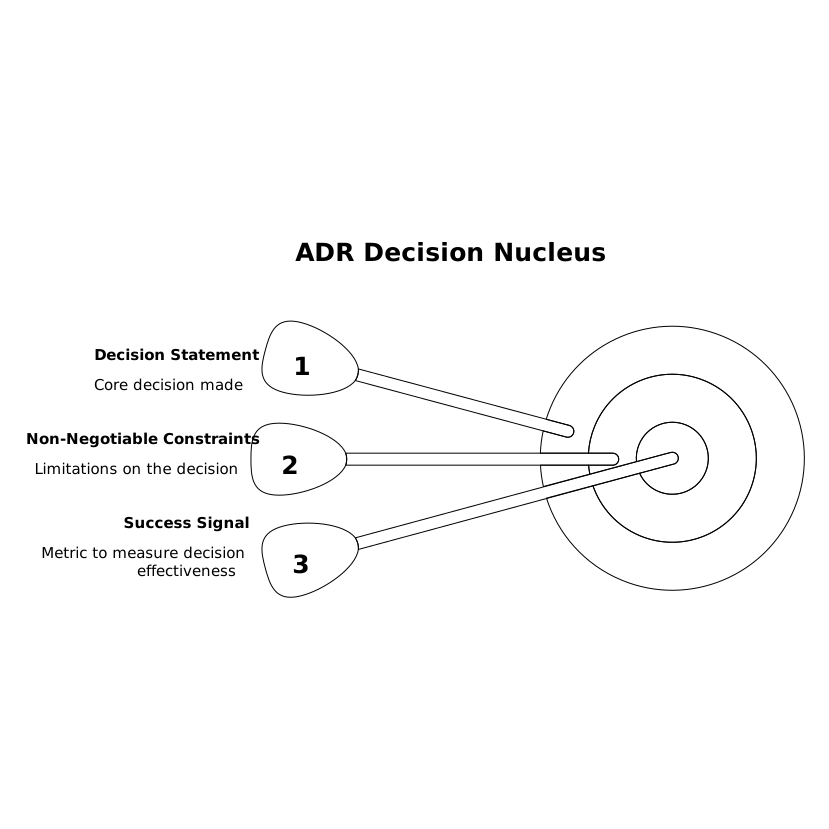
If you can’t write the one-sentence decision without qualifiers, your ADR is probably mixing multiple decisions. Split it now; your diagram will be cleaner and your alignment faster.
Minutes 3–8: Reduce the ADR into four alignment blocks
Most ADRs contain more detail than most stakeholders need. Instead of compressing everything, choose the blocks that drive alignment. In practice, four blocks cover almost every cross-functional conversation:
1) Context and trigger
Two to four bullets: what changed, what broke, what scale boundary you hit, or what new requirement forced the decision. Avoid history lessons.
2) Options considered
List 2–4 options max. For each option, add one “why it’s attractive” bullet and one “why it fails” bullet. This is where alignment happens: people disagree less when they can see why alternatives were rejected.
3) Decision and rationale
Pick 3–5 reasons, phrased as tradeoffs, not marketing. Example: “We accept higher operational complexity to reduce customer-facing latency.”
4) Consequences
Split consequences into “now” and “later.” Include migration work, operational load, new failure modes, and the team that owns ongoing support. If you’re trying to prevent scope drift later, this section matters as much as the decision itself.
Minutes 8–14: Convert the blocks into a one-page diagram
Now translate the four blocks into a layout that reads top-to-bottom in under a minute. A simple structure works best:
- Top banner: Decision statement + date + owner
- Left column: Context/trigger
- Center column: Options considered (with a clear highlight on the chosen one)
- Right column: Consequences (now/later)
- Footer: Risks, guardrails, and open questions
This is where a “text-to-visual translator” is genuinely helpful. With napkin.ai, you can paste your reduced blocks and generate a clean diagram quickly, then tweak labels, grouping, and emphasis without wrestling with boxes for half an hour. The key is not fancy visuals; it’s consistent visual hierarchy: bold the decision, visually separate rejected options, and keep consequences scannable.
Keep the diagram printable on a single page. If it can’t fit, you didn’t fail at layout—you kept too much text. Cut harder.
Minutes 14–18: Add what cross-functional partners actually need
Engineering teams often stop after the “decision” and “options” sections. Cross-functional alignment improves dramatically when you add three extra elements that answer the questions people ask in review meetings.
Risks and failure modes
Add 3–5 risks maximum. Phrase each as: “If X happens, impact is Y, mitigated by Z.” This keeps the diagram from becoming a vague risk list.
Guardrails and invariants
Guardrails are the “we will not” statements. Examples: “No customer PII in logs,” “No synchronous dependency on vendor API,” “All writes remain idempotent.” Guardrails make security and compliance reviews faster because they can validate boundaries, not intentions.
What changes for whom
Create a small table-like area with bullets:
- Product: user-visible behavior, rollout plan constraints
- Support/CS: new troubleshooting steps, expected incidents
- Data/Analytics: new events, schema changes, attribution impacts
- Security/IT: access, logging, retention, audit requirements
If your organization struggles with handoffs, this section pairs well with a transcript-first approach—your diagram becomes the artifact that turns “we talked about it” into “we can ship it.” If that’s a recurring pain point, see the workflow in Transcript-First Handoff for Customer Calls That Engineers Can Ship.
Minutes 18–20: Run the alignment check and publish
Before you share the diagram broadly, do a two-minute “alignment check” against the ADR:
- Completeness: Does the diagram reflect the actual decision and the real reasons?
- Honesty: Are tradeoffs stated plainly (cost, latency, complexity, risk)?
- Traceability: Is there a link back to the ADR for deep details and future audits?
- Actionability: Is it obvious what work happens next and who owns it?
Then publish it where decisions are consumed, not where they’re archived: in the PR, the main ticket, and the planning doc. If you’re trying to avoid drift between what was decided and what gets built, make the diagram the stable reference and link it everywhere—similar to the discipline described in Avoid Spec Drift by Keeping PRs Issues and Release Notes Aligned.
What a good one-page decision diagram looks like in practice
You’ll know the diagram is doing its job when:
- Non-engineers can explain the tradeoff in their own words after reading it once.
- Engineers can implement without reopening fundamental debates.
- Security and compliance reviews focus on concrete guardrails.
- New teammates can understand “why” months later without Slack archaeology.
The win isn’t aesthetics. It’s shrinking the time between “decision recorded” and “decision understood.” When the ADR stays the source of truth and the diagram becomes the alignment surface, you get both rigor and speed.
Frequently Asked Questions
How does napkin.ai help turn an ADR into a decision diagram quickly?
napkin.ai takes the reduced ADR text (decision, options, rationale, consequences) and converts it into a clean visual layout you can edit, so you spend time clarifying—not drawing boxes.
What should I include in a one-page decision diagram made from an ADR?
Include the decision statement, brief context, 2–4 options with why-not reasons, key rationale, consequences (now/later), and a small section for risks and guardrails. Then link back to the full ADR for detail.
Should the napkin.ai diagram replace the ADR?
No. Treat the napkin.ai diagram as the fast alignment artifact and keep the ADR as the durable record for auditing, deep rationale, and long-term context.
How do I keep the diagram from becoming another long document?
Use strict limits: one sentence for the decision, a few bullets per block, and a maximum of 2–4 options. If it doesn’t fit on one page, cut detail and rely on the ADR link for depth.
Who should review the napkin.ai decision diagram before it’s shared widely?
At minimum: the decision owner (usually an engineer or architect), a product counterpart for tradeoffs and rollout impact, and a security or platform reviewer if guardrails or access changes are involved.