Close the Meeting Memory Gap With a 5-Minute Workflow for Decisions, Tasks, and CRM Updates
By Taylor
A 5-minute workflow to turn video calls into searchable decisions, clear action items, and reliable CRM updates.
Why the meeting memory gap keeps costing teams time
Most teams don’t lose time because meetings happen; they lose time because the outputs of those meetings are hard to retrieve and even harder to operationalize. Decisions get buried in chat, action items drift across tools, and key customer details never make it into the CRM. A week later, someone asks “What did we agree?” and the answer becomes a scavenger hunt.
The fix isn’t “take better notes.” It’s a lightweight workflow that turns video calls into three durable assets: searchable decisions, assignable action items, and structured CRM updates—fast enough that it actually gets done. Tools like Fathom are built for this exact gap: record and transcribe calls, produce immediate summaries and action items, and help teams query past conversations without reopening the whole meeting.
The 5-minute post-call workflow that actually sticks
The goal is to standardize what happens right after a call, while context is fresh and before people jump to the next meeting. This workflow assumes your meeting is recorded and transcribed, and that you can generate a structured summary plus extract key moments. The steps below stay consistent whether the meeting is internal (planning, reviews) or external (sales, customer success, discovery).
Minute 0–1: Confirm the “decision log” in plain language
Start by capturing decisions as statements that can’t be misread. A useful test is whether a teammate who didn’t attend can act on them without asking follow-ups. Write each decision as:
- Decision: What was decided (one sentence).
- Owner: Who is accountable.
- Effective date: When it takes effect.
- Scope: Which customers/projects/teams it applies to.
If you’re using an AI notetaker, this is where you skim the auto-summary and correct any subtle ambiguities (names, numbers, dates, product terms). A small correction here prevents weeks of rework later.
Minute 1–3: Turn “we should” into trackable action items
Action items fail when they’re phrased like intentions. Convert them into tasks that are measurable and time-bound:
- Verb-first: “Send,” “Draft,” “Review,” “Decide,” “Implement.”
- Single owner: Teams can help, but one person owns.
- Deadline: A date, not “ASAP.”
- Definition of done: What output exists when completed.
Many teams also benefit from adding a short “blocked by” field when tasks depend on another person or a customer response.
This step is where integrations matter. If your meeting output can sync into task tools (Asana, Notion, or a Slack channel for triage), you avoid copying and pasting and reduce the chance that action items die in a document. Fathom-style workflows typically shine here because the summary and tasks are generated immediately when the call ends and can be routed to the right place.
Minute 3–4: Create two searchable anchors: highlights and keywords
Transcripts are useful, but they’re still long. Make the meeting searchable by creating a small number of anchors that future-you can find quickly:
- 2–4 highlights for moments that should be replayed (a customer objection, a technical constraint, a pricing agreement, a stakeholder concern).
- 5–10 keywords that match how your team searches (project codename, competitor mentioned, product module, renewal date, risk type).
When your tool supports clips and playlists, highlights become a faster way to share context than forwarding a whole recording—especially for onboarding, deal reviews, or post-mortems.
Minute 4–5: Push structured updates into the CRM
CRMs don’t fail because teams dislike them; they fail because updates feel duplicative. The workaround is to treat the meeting as the source of truth and the CRM as the structured destination. In five minutes, aim to update only the fields that drive downstream work:
- Next step (what, who, when)
- Current stage and rationale
- Key stakeholders and roles
- Risks (security, timing, budget, technical blockers)
- Commitments made on the call (discount, timeline, deliverable)
If your workflow supports CRM field sync (e.g., Salesforce or HubSpot), you can map meeting outputs to fields so the update is closer to “review and confirm” than “rewrite everything.” For teams managing multiple threads, a consolidated view of activity per deal also reduces the common “I wasn’t on that call” problem.
How to design the meeting template that makes this effortless
A repeatable workflow needs a repeatable template. The best templates are short, consistent, and designed for scanning. Use sections that match how you’ll search later:
- Context: What this meeting was for (one sentence).
- Decisions: Bulleted with owner + date.
- Action items: Bulleted with owner + deadline.
- Risks/open questions: What could derail the plan.
- CRM-ready fields: The handful of updates you always need.
When you want to share decisions across teams, diagrams can be a helpful complement—especially for complex systems or multi-step rollouts. If you’re documenting more than a simple decision list, the 30-minute system diagram approach can help teams align quickly without re-litigating the meeting.
Make the output reliable with governance, not more meetings
Even with a strong workflow, two issues usually undermine reliability: inconsistent vocabulary and unclear accountability.
Standardize vocabulary for higher-quality summaries
Team-specific terms (product modules, customer names, acronyms) are where summaries and transcripts degrade. Maintain a shared vocabulary list and keep it current. This improves search and reduces errors that later appear in CRM fields or action lists.
Assign a “meeting output owner” by default
Not every meeting needs a formal note-taker, but every meeting benefits from an explicit owner who confirms the decisions and action items within minutes. Rotate the role or assign it by function (e.g., the account owner for customer calls, the project lead for delivery calls).
Operationalizing searchable decisions across the organization
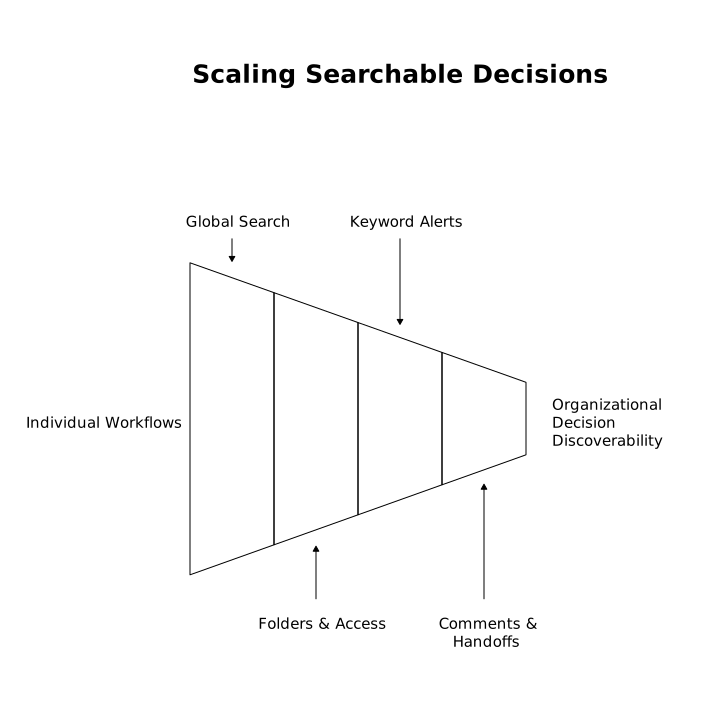
Once the workflow is working for individuals, scale it by making outputs discoverable across teams:
- Global search: Ensure people can search across transcripts and summaries, not just within a folder.
- Folders and access controls: Separate customer calls, hiring, and internal strategy with clear permissions.
- Alerts for keywords: Get notified when topics like “security review,” “budget freeze,” or a competitor name appears.
- Comments and handoffs: Let teammates annotate key moments and assign follow-ups without replaying the meeting.
If you want meeting outputs to be usable by both humans and AI systems later, structure matters. A well-formed FAQ section and schema can help knowledge stay attributable and retrievable without cluttering your pages.
What “under 5 minutes” really means in practice
“Under 5 minutes” doesn’t mean perfect documentation. It means capturing the smallest set of high-leverage outputs so work can continue without backtracking:
- 3–7 decisions max (often fewer)
- 3–10 action items that have owners and dates
- 2–4 highlights that preserve nuance
- 5 CRM updates that protect revenue and forecasting
When the meeting output is immediate, searchable, and routed into the tools where work happens, the memory gap closes. You spend less time reconstructing context and more time executing on what the team already agreed to.
Vertical Video
Frequently Asked Questions
How does Fathom help reduce the meeting memory gap?
Fathom records and transcribes calls, produces immediate summaries and action items, and makes past conversations searchable so decisions and follow-through don’t get lost.
What should I capture from a meeting if I only have 5 minutes after using Fathom?
Focus on decision statements (with owner and date), task-ready action items (owner + deadline), a few replayable highlights, and the small set of CRM fields your team relies on.
Can Fathom workflows support Salesforce or HubSpot updates?
Yes. Fathom supports CRM integrations and field sync workflows so meeting outcomes can be reviewed and pushed into Salesforce or HubSpot with less manual copying.
What’s the best way to make Fathom notes searchable for the whole team?
Use consistent keywords, maintain a shared vocabulary for customer and product terms, and organize outputs with folders and permissions so teammates can reliably find decisions later.
How do I prevent inaccurate action items when using Fathom summaries?
Do a quick human verification pass right after the meeting—confirm names, dates, numbers, and ownership—then convert any vague “we should” statements into verb-first tasks with a definition of done.