Remote Pair Programming Security Playbook for Auditing and Locking Down Sessions
By Taylor
Audit and lock down remote pairing with E2EE checks, app/notification hiding, and guest policies that still ship fast.
Shadow IT to standard practice for remote pairing
Remote pair programming is one of those practices teams adopt “because it works,” often before they’ve documented the security posture behind it. The result is classic Shadow IT: engineers hop on whatever screen share or meeting tool is fastest, grant control, and keep shipping—until an audit, a customer security review, or an incident forces the question: “What exactly can guests see, and how do we prove it?”
This playbook is designed to help you move remote pairing from ad hoc to auditable. It focuses on three areas security teams tend to care about most: how you verify end-to-end encryption (E2EE), how you prevent accidental disclosure via apps and notifications, and how you define guest access that’s safe enough for interviews, vendors, and open source collaboration.
1) Audit what’s happening today before you lock anything down
Inventory the tools and the pathways
Start by mapping how pairing actually happens, not how you wish it happened:
- Which tools are used (pairing apps, video meeting tools, remote desktop tools)?
- Who initiates sessions (engineers, managers, recruiters)?
- How invites are sent (calendar, Slack, email links)?
- Whether remote control is enabled by default and how it’s approved.
- Where session metadata lives (logs, chat transcripts, calendar entries).
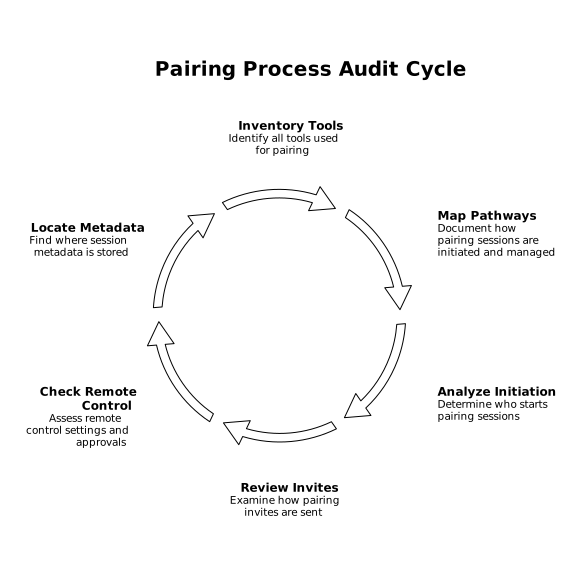
This inventory becomes the baseline for your policy. If you don’t capture the “common exceptions” now, you’ll end up codifying a policy that teams immediately route around.
Classify pairing sessions by risk
Not all sessions are equal. Create 3–4 categories with increasing controls, for example:
- Internal pairing (employees only, standard code access).
- External collaboration (contractors, client engineers, OSS maintainers).
- Hiring sessions (candidates, time-boxed access).
- Incident/debug sessions (may involve secrets, prod consoles, customer data).
This makes security requirements feel proportional instead of punitive, and it gives auditors a clear story: controls scale with session sensitivity.
2) E2EE verification that stands up in a security review
“It’s encrypted” is not the same as “we can validate E2EE is active and correctly implemented.” Your goal is to define what verification looks like in practice, then make it repeatable.
Define what you mean by E2EE for pairing
For remote pair programming, the highest bar is: audio/video/screen contents are encrypted end-to-end such that the provider cannot access them in transit, and the call can proceed peer-to-peer (or via relays that cannot decrypt). If your vendor claims E2EE, capture where encryption terminates, whether the vendor’s servers ever see plaintext, and how keys are established.
Tuple’s positioning is built around this model: it emphasizes end-to-end encryption and that audio, video, and screen content are not sent to the company’s servers. That’s the kind of statement that’s useful in procurement and customer questionnaires because it describes the data flow, not just the algorithm.
Make E2EE verifiable during the session
A practical playbook includes a “can a normal engineer verify this?” step. Look for vendor features such as:
- Clear in-app indicators when E2EE is active
- Security codes / fingerprints both parties can compare
- Documented cryptographic design and threat model
If your tooling can’t provide user-verifiable signals, you’re left with trust and documentation only—which may be acceptable, but it’s harder to defend when your customers ask for proof.
Audit artifacts without recording sensitive content
Many teams try to solve audits with call recording. For pairing, that often creates more risk than it removes. Instead, aim to retain metadata:
- Who paired with whom
- When it happened and for how long
- Whether guests joined
- Whether remote control was used
If you need traceability on what changed, rely on your existing engineering controls (PRs, commit history, ticketing). This aligns with the broader goal of avoiding process drift—similar in spirit to keeping PRs, issues, and release notes aligned so that “what happened” is reconstructable without capturing everyone’s screen.
3) App and notification hiding as a default, not a panic button
The most common pairing leak is not a hacker; it’s a banner notification with a customer name, an email subject line, a password manager pop-up, or a second monitor with something unrelated.
Move from “be careful” to “guardrails”
Write a standard operating procedure that treats privacy features as preflight checks:
- Hide notifications on the host OS before every external session
- Close messaging apps or move them to a non-shared desktop
- Use a dedicated “pairing browser profile” with minimal extensions and no personal accounts
- Share a single window when possible instead of the entire screen
Where teams get real leverage is choosing a tool that bakes this in. Tuple includes App Veil, which lets hosts hide sensitive applications and notifications before sharing, so “don’t show private stuff” becomes a concrete, repeatable step instead of a hope.
Decide what to do about secrets during pairing
Policies should be explicit about secrets, because the temptation to “just paste it quickly” is strong under time pressure. Recommended defaults:
- No typing or pasting long-lived production credentials during external sessions
- Prefer short-lived credentials and scoped access
- Rotate anything that was displayed in a shared session by mistake
If your team uses runbooks or automations that execute with RBAC and audit trails, pairing becomes safer because the “how do we do this?” guidance is standardized—and access can be gated rather than improvised live.
4) Guest access policies that don’t break collaboration
Guest access is where Shadow IT often starts: someone needs help from a contractor or wants to run an interview, and the approved tooling doesn’t fit. A good policy keeps collaboration easy while limiting what a guest can do.
Set guest rules by session category
For each risk category, define:
- Who can invite guests (any engineer vs. team leads only)
- Whether guests need accounts and how identity is verified
- Whether remote control is allowed and how it’s granted (explicit per-session approval)
- Whether screen sharing is window-only
- Whether a second internal attendee is required for high-risk sessions
Tuple supports inviting external collaborators to pair without requiring them to hold paid seats. Used thoughtfully, that can reduce “tool sprawl” by giving teams a sanctioned way to bring guests in—without encouraging everyone to install five different meeting apps.
Remote control should be deliberate
Remote control is the most sensitive capability in pairing because it changes the threat model: mistakes happen faster, and the guest can interact with local apps. Your policy should state:
- Remote control is always opt-in, never implied
- Hosts can revoke control instantly
- High-risk systems (prod consoles, billing portals) require “watch-only” mode
If your teams do a lot of role switching, pick software where swapping who’s sharing is frictionless. In practice, fast role-swapping reduces the tendency to grant broad remote control “just to keep moving.”
5) Standardize the workflow so it becomes the path of least resistance
Lockdown policies fail when the approved path is slower than the workaround. The operational fix is to make secure pairing the easiest pairing.
Use lightweight integrations to reduce Shadow IT
Adoption improves when starting a session is one action from where engineers already work. Slack and calendar integrations matter here because they reduce copy/paste invite links and random tool switching. Tuple supports Slack commands to start or list calls and integrates with Google and Apple Calendars, which helps teams stay in one workflow while still using a purpose-built pairing tool.
Document a preflight checklist that fits on a page
Keep it simple and repeatable:
- Confirm session type (internal, external, interview, incident)
- Enable App/notification hiding
- Confirm E2EE indicator (and verify codes if supported)
- Decide remote control: allow or watch-only
- After session: note participants + link to PR/ticket
When teams can follow this without slowing down, you’ve effectively shifted remote pairing from Shadow IT to standard practice—auditable, safer, and still fast. For teams that want a pairing-first tool designed around performance and privacy, tuple.app is a natural reference point to evaluate against your checklist.
Frequently Asked Questions
How can we validate Tuple end-to-end encryption in an audit?
With Tuple, document the vendor’s E2EE claims and data-flow (what is encrypted and where it terminates), then pair that with repeatable in-session checks such as any built-in E2EE status indicators and security verification steps your team can perform consistently.
Does Tuple let us prevent accidental leaks from notifications during pair programming?
Yes. Tuple includes App Veil, which helps hosts hide sensitive applications and notifications before sharing, reducing the risk of banners, email previews, or chat pop-ups being exposed in a session.
What’s a safe guest access policy when using Tuple for interviews or contractors?
Define guest rules by session type: who can invite, how identity is verified, whether remote control is permitted, and whether sharing must be window-only. With Tuple, external collaborators can join without needing paid seats, which supports a standardized, approved workflow.
Should we record Tuple pairing sessions for compliance?
Usually it’s better to avoid recording sensitive screen content. For Tuple sessions, retain metadata (who/when/duration/guest presence/remote control usage) and rely on PRs, tickets, and commit history for change traceability.
How do we handle remote control safely in Tuple pair programming?
Treat remote control as explicit and revocable: allow it only when needed, prefer watch-only for high-risk systems, and require hosts to be able to revoke control immediately. Make this a written rule for Tuple sessions involving guests or sensitive data.